Feature Spotlight: Point-in-Time Recovery for PostgreSQL is now GA

Date
Date
Reading time
Reading time
2 min read
2 min read
Point-in-time recovery (PITR) for Aptible Managed PostgreSQL databases is now generally available, at no additional cost.
PITR lets you restore any PostgreSQL database to a specific timestamp within the last 24 hours, not just to the nearest scheduled backup window. If a deployment goes wrong at 2:47 PM and your last snapshot is from midnight, that's a meaningful gap when you're dealing with patient data. PITR closes it.
Why this matters
HIPAA's contingency plan requirements (§164.308(a)(7)) require documented disaster recovery procedures covering data backup and restoration. Daily snapshots technically satisfy that bar, but PITR raises it by letting you demonstrate the ability to recover PHI to within minutes of any incident (a materially stronger posture in audits and enterprise security reviews).
For SOC 2, the same logic applies to your availability and recovery objectives.
How it works
When you trigger a restore, Aptible provisions a new database from the latest qualifying backup before your target timestamp, then replays archived WAL (write-ahead log) data up to the specified recovery point. The restore creates a new database. Your original is untouched.
How to use it
PITR is enabled by default on all Aptible Managed PostgreSQL 13+ databases, with two exceptions: end-of-life versions and databases with backups disabled. Some databases require a restart before PITR activates automatically.
To check whether PITR is active on any database, look for the Backups column on the Databases list view, or the Point-in-Time Recovery attribute on a database's detail page.
To restore a PITR-enabled database:
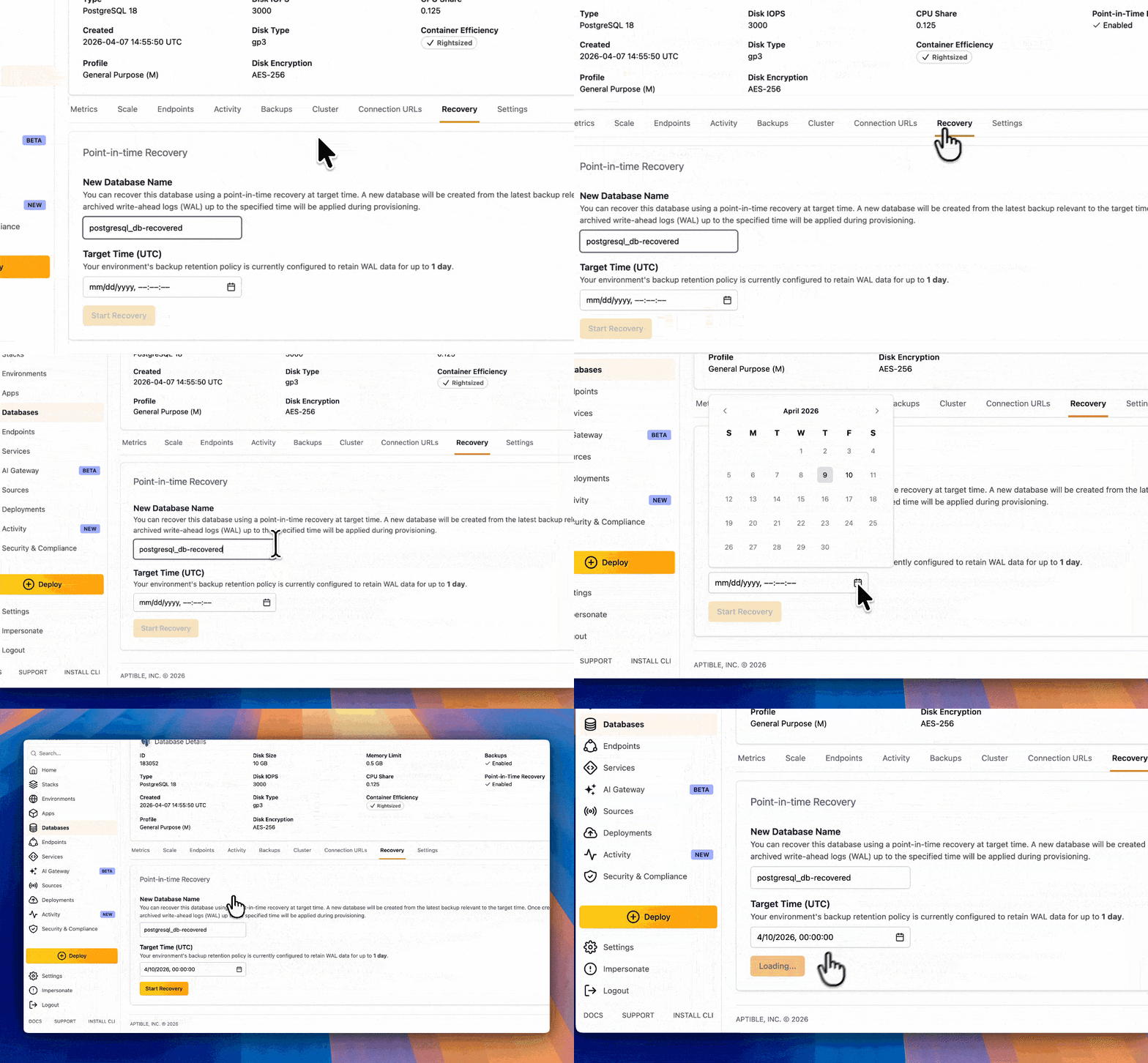
Go to the Recovery tab on the database's detail page
Provide a name for the new database
Enter the target timestamp
Currently, PITR restores are scoped to timestamps within the last 24 hours. If you need to restore to a point older than that, reach out in your Aptible support Slack channel.
Getting started
PITR is on by default. Check your Databases list to confirm it's enabled on your databases, and familiarize yourself with the Recovery tab before you need it.
Full documentation: Point-in-time-Recovery
Point-in-time recovery (PITR) for Aptible Managed PostgreSQL databases is now generally available, at no additional cost.
PITR lets you restore any PostgreSQL database to a specific timestamp within the last 24 hours, not just to the nearest scheduled backup window. If a deployment goes wrong at 2:47 PM and your last snapshot is from midnight, that's a meaningful gap when you're dealing with patient data. PITR closes it.
Why this matters
HIPAA's contingency plan requirements (§164.308(a)(7)) require documented disaster recovery procedures covering data backup and restoration. Daily snapshots technically satisfy that bar, but PITR raises it by letting you demonstrate the ability to recover PHI to within minutes of any incident (a materially stronger posture in audits and enterprise security reviews).
For SOC 2, the same logic applies to your availability and recovery objectives.
How it works
When you trigger a restore, Aptible provisions a new database from the latest qualifying backup before your target timestamp, then replays archived WAL (write-ahead log) data up to the specified recovery point. The restore creates a new database. Your original is untouched.
How to use it
PITR is enabled by default on all Aptible Managed PostgreSQL 13+ databases, with two exceptions: end-of-life versions and databases with backups disabled. Some databases require a restart before PITR activates automatically.
To check whether PITR is active on any database, look for the Backups column on the Databases list view, or the Point-in-Time Recovery attribute on a database's detail page.
To restore a PITR-enabled database:
Go to the Recovery tab on the database's detail page
Provide a name for the new database
Enter the target timestamp
Currently, PITR restores are scoped to timestamps within the last 24 hours. If you need to restore to a point older than that, reach out in your Aptible support Slack channel.
Getting started
PITR is on by default. Check your Databases list to confirm it's enabled on your databases, and familiarize yourself with the Recovery tab before you need it.
Full documentation: Point-in-time-Recovery
Related posts
More on this topic from the Aptible blog.
More on this topic from the Aptible blog.


548 Market St #75826 San Francisco, CA 94104
© 2026. All rights reserved. Privacy Policy
548 Market St #75826 San Francisco, CA 94104
© 2026. All rights reserved. Privacy Policy
548 Market St #75826 San Francisco, CA 94104
© 2026. All rights reserved. Privacy Policy