
" transform="translate(2 2)" width="36px"/></svg>)
" transform="translate(6 2)" width="27.99999936358131px"/></svg>)
Horizontal autoscaling
production or enterprise
Scale container count up and down automatically based on CPU usage, with configurable minimums and maximums. Containers scale without restarting, so scale-downs don't interrupt running jobs or open connections.
Vertical autoscaling
Enterprise only
Automatically resize containers based on actual memory and CPU usage over time, without manual revisits as workloads change.
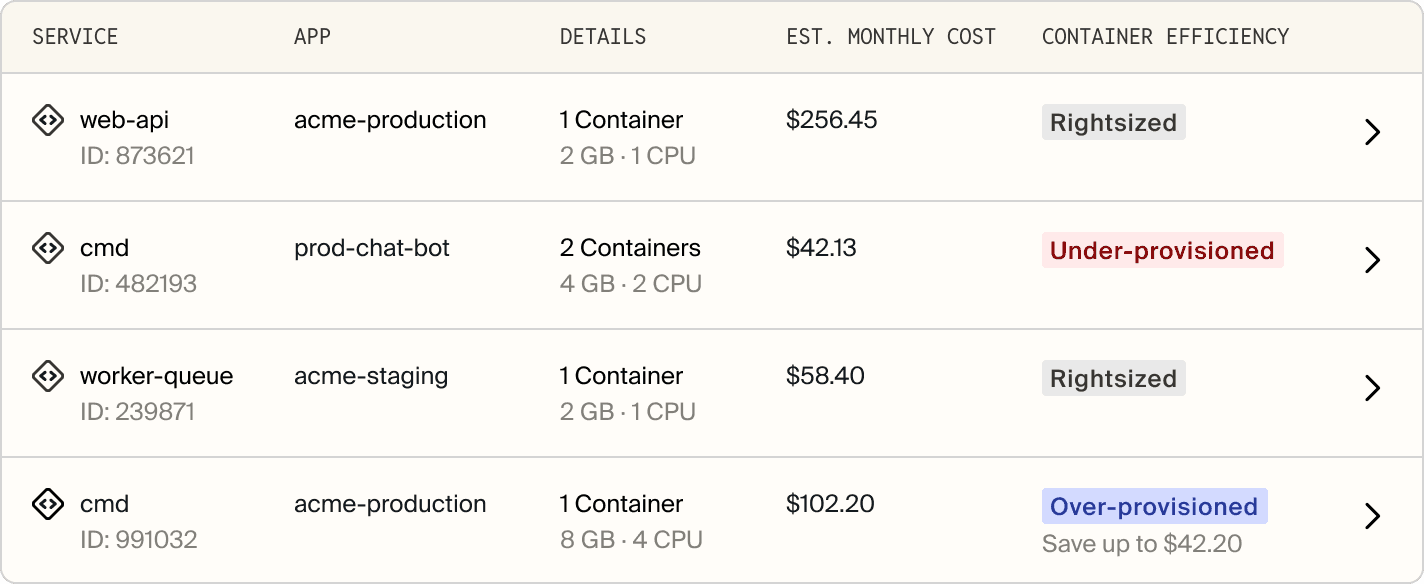
Container Efficiency Recommendations
See which app services and databases are over-provisioned, under-provisioned, or rightsized, with recommended container sizes, estimated monthly savings, and a single button to apply the change. Customers switching to CPU- or memory-optimized container profiles have reduced container costs by up to 50%.
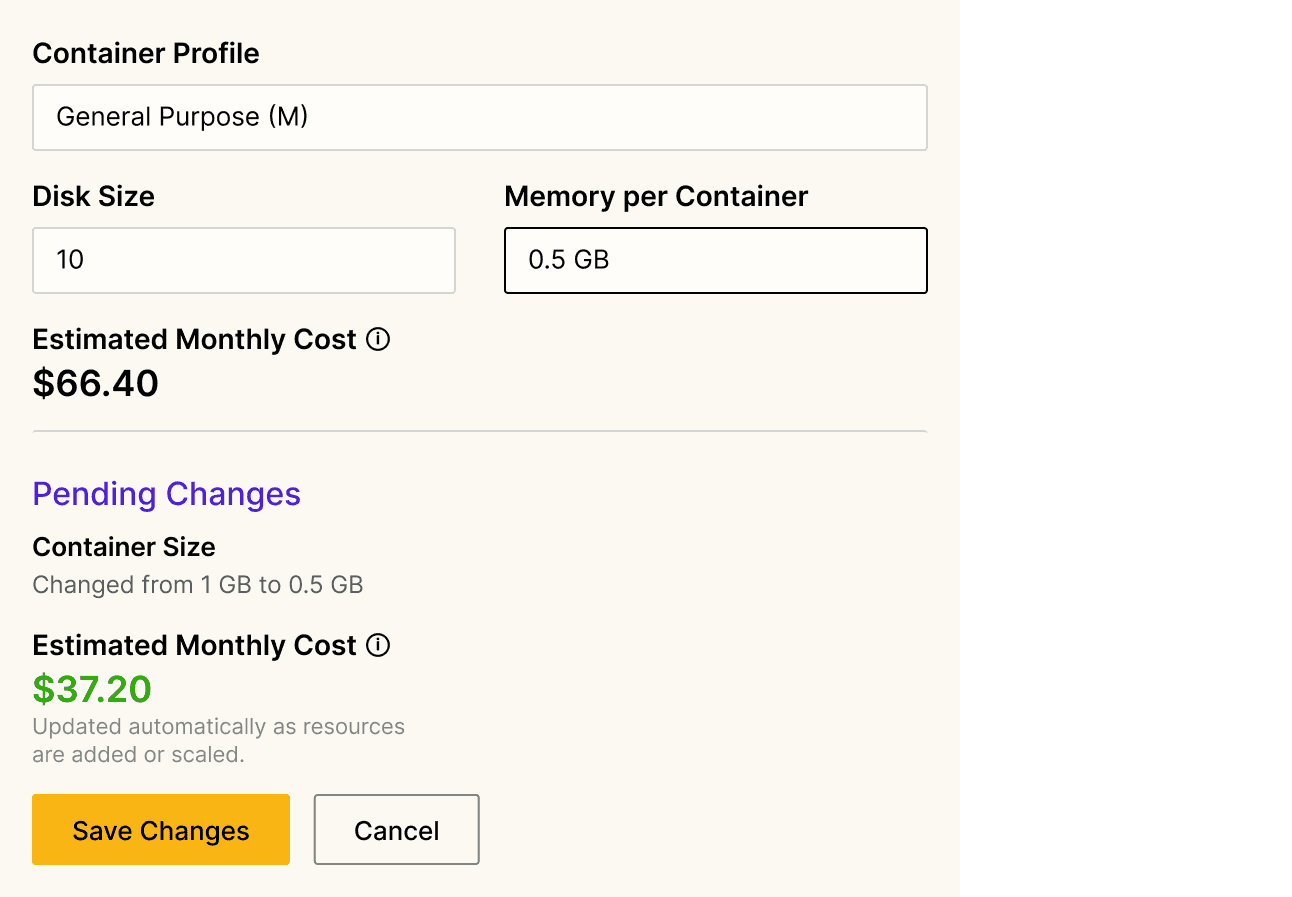
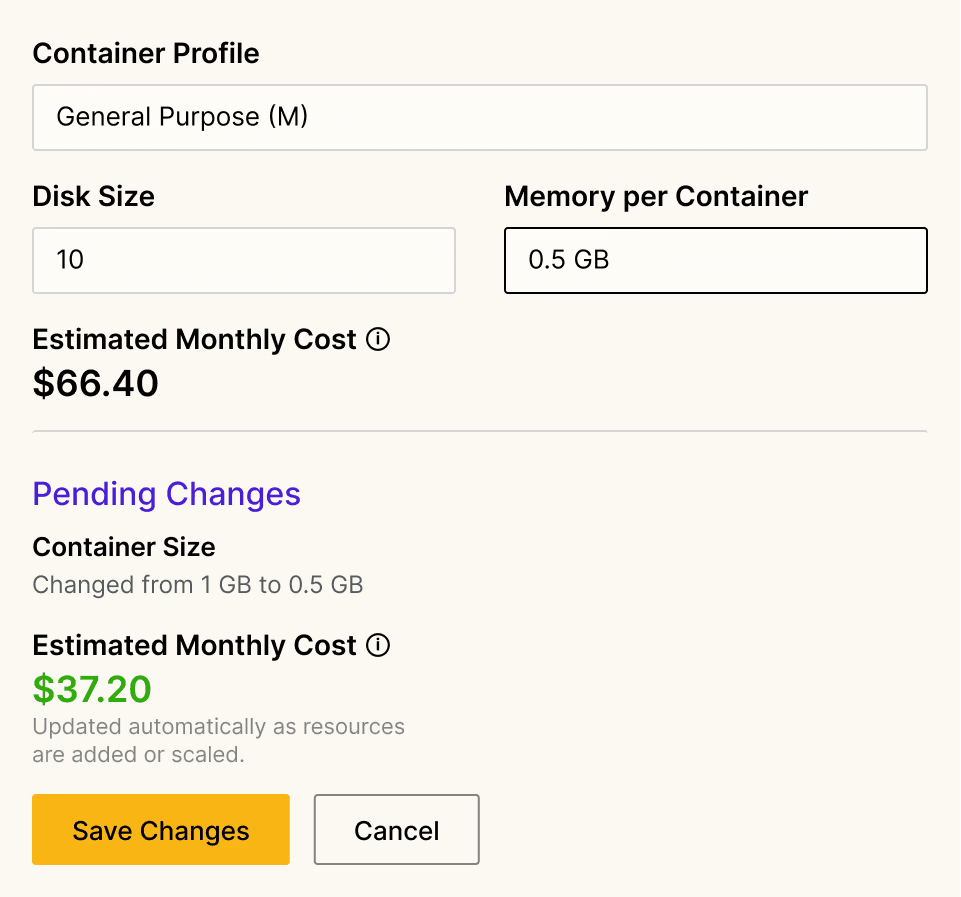
Real-time cost estimates
Every Stack and Environment shows a live monthly cost estimate that updates as you provision, scale, or remove resources. Draft invoices give finance and leadership mid-month visibility into what you'll owe before the invoice arrives, and a billing-only role lets them access cost data without infrastructure permissions.
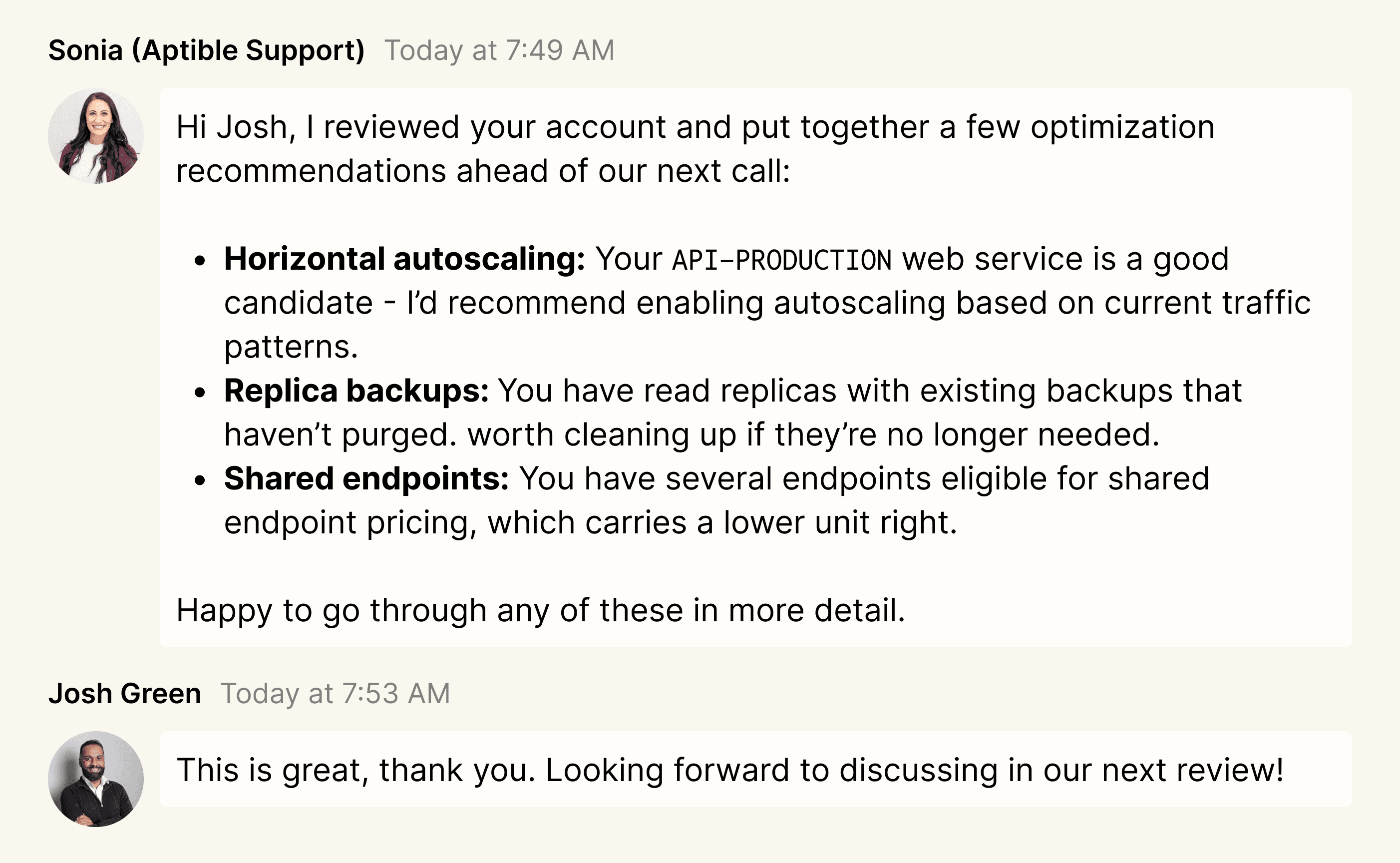
Infrastructure optimization support
Aptible's platform team reviews accounts proactively and surfaces cost-reduction opportunities you may not have found on your own: oversized container profiles, backup accumulation, shared endpoint candidates, and overprovisioned staging resources. Customers have reduced backup spend by up to 50% and cut monthly infrastructure costs by thousands of dollars through optimization reviews alone.
View docs
Reclaim spend from infrastructure you provisioned at launch and never revisited
Container sizes from early sprints don't get revisited, and the cost compounds quietly. Container Efficiency Recommendations surface what's worth changing and how much, so right-sizing happens instead of getting deprioritized indefinitely.
Scale with demand instead of provisioning for peak traffic
Pre-provisioning for peak traffic means paying for that capacity whether demand justifies it or not. Horizontal autoscaling scales container count up when traffic spikes and back down when it drops, so infrastructure spend reflects actual usage, not worst-case assumptions.
Keep costs visible and predictable as the team grows
As more engineers provision resources and environments accumulate, it becomes hard to know what you're spending until the invoice arrives. Real-time cost estimates, configurable backup retention, and a billing-only role for finance give teams the controls to stay on top of spend without making it anyone's full-time job.
Teams working with Aptible's platform engineers on regular cost reviews have cut monthly spend by thousands of dollars on resources they didn't even know to look at.
FAQs
What's the minimum monthly cost for HIPAA-ready production infrastructure?
For apps and databases handling PHI, you need the Production plan, a dedicated stack, and an executed BAA. A dedicated stack is \$499 per month and is required for HIPAA-ready production infrastructure on Aptible.
Infrastructure usage is billed on top of that: containers, integrations such as VPNs, endpoints, backups, replicas, and storage. Standard support is included at no cost, so \$499 plus usage is the starting point for HIPAA-ready production infrastructure.
Actual monthly cost depends on your architecture and usage, including app containers, managed databases, backups, endpoints, replicas, and storage. Aptible’s HIPAA documentation explains the infrastructure requirements for handling PHI.
The Startup Program offers discounted infrastructure for your first six months.
What drives my bill?
Your bill is driven by the plan base fee plus infrastructure usage. Usage breaks down into app containers, database containers, database disk, backups and retention, cross-region backup copies if enabled, endpoints, replicas, and additional environments or stacks.
Container cost depends on the container profile: General Purpose at \$0.08 per GB-hour, Memory Optimized at \$0.05, and CPU-Optimized at \$0.10. The pricing page is the source of truth for current rates.
Support is priced separately, with Standard included at no cost.
How does autoscaling affect cost, and what triggers scaling?
Autoscaling tracks resource usage to demand, so it can reduce spend during quiet periods and increase it under load, instead of paying for peak capacity continuously.
Aptible’s app scaling docs cover manual and automatic scaling. Horizontal autoscaling is available on Production and Enterprise; vertical autoscaling is Enterprise only.
By default, autoscaling evaluates every five minutes against a 30-minute lookback at the 99th percentile across the service’s containers, but those settings are configurable.
Horizontal autoscaling scales on CPU. Vertical autoscaling scales on memory and the memory-to-CPU ratio, and can shift a service between container profiles when that ratio crosses your thresholds. Cooldowns default to one minute after scaling up and five minutes after scaling down, with an extra five minutes after any release.
You can configure percentile, minimums and maximums, scale steps, thresholds, evaluation settings, and cooldowns from the dashboard, the CLI, or Terraform. Scaling is usage-triggered, not scheduled by time of day.
How can I reduce backup costs?
Backup spend follows the environment’s backup retention policy, which defaults to 30 daily, 12 monthly, and 6 yearly snapshots. Aptible’s backup strategy guidance recommends a leaner policy for non-production: 1 to 14 daily backups, no monthly, no yearly, cross-region copies off, and final backups off. For production, it recommends 14 to 30 daily, 12 monthly, and 5 yearly.
Beyond retention, disable cross-region copies you don’t need for DR, clean up orphaned backups with aptible backup:orphaned and aptible backup:purge, and check whether replica backups are worth keeping.
How can I estimate costs before migrating?
Use the cost estimator on the pricing page, which walks through compliance needs, plan, apps, databases, and add-ons to produce a monthly estimate. Map your current architecture first: apps and services, container sizes, databases, disk, backups, endpoints, environments, replicas, and network integrations.
Container profiles are a key part of the estimate because they determine container pricing. For a serious migration, ask Aptible to review the estimate and the assumptions behind it. Ongoing cost optimization reviews are included on Premium and Enterprise support.