
We rebuilt the Aptible Activity page from the ground up, and the result is something we're genuinely excited about: a comprehensive audit log that gives you complete visibility into everything happening across your platform.
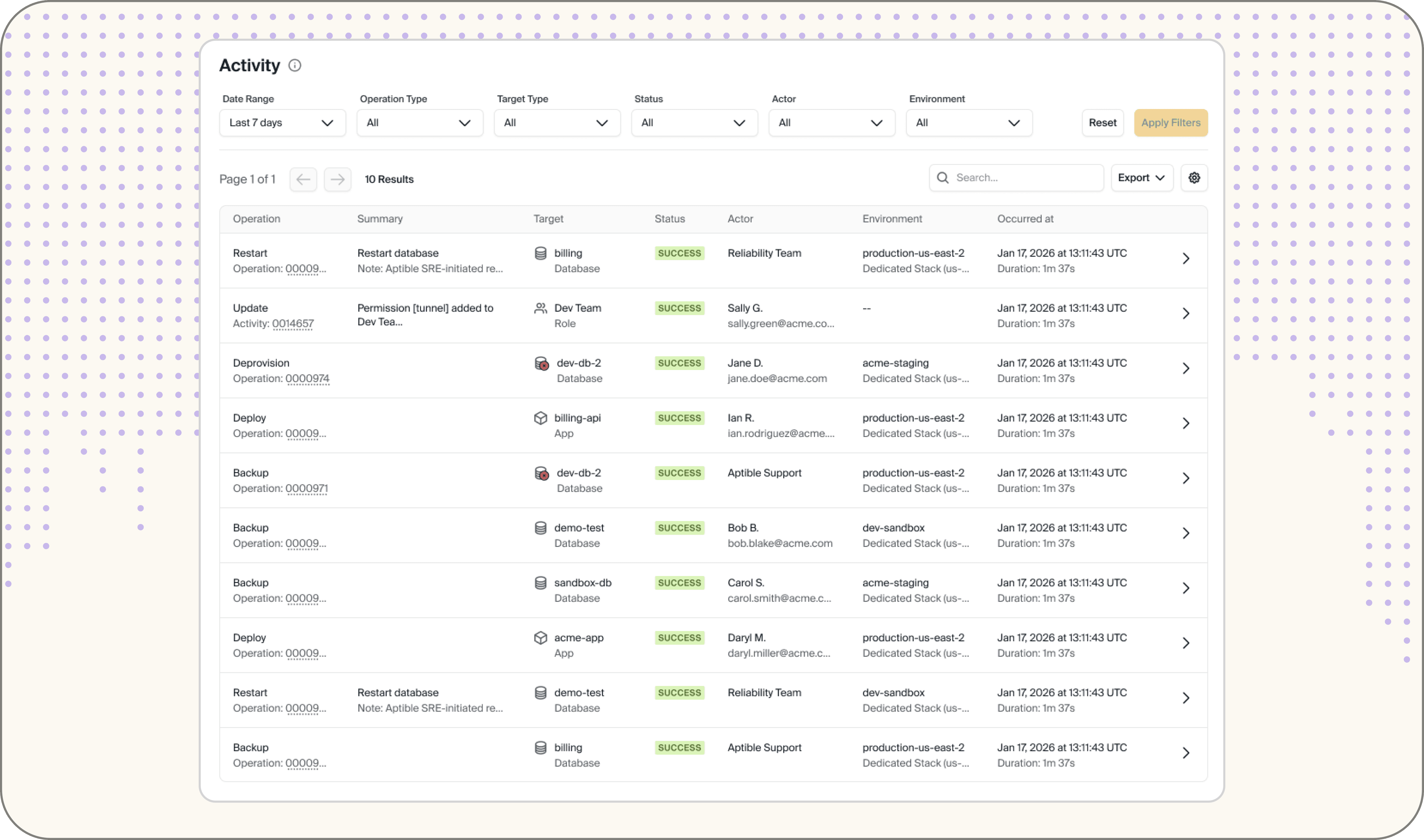
It now captures authentication events alongside platform operations, retains your complete history with no lookback limit, and streams directly to your SIEM.
Here's what's new.
Authentication Activity
For the first time, Activity captures authentication operations: successful logins, failed login attempts, role changes, permission updates, and more. You now have a single place to answer "who accessed what, and when?", a must-have for SOC 2, HIPAA, and any serious security posture.
More Operations Than Ever
We've significantly expanded the range of operations in Activity. You'll now see LLM key creation, read-only operations like sensitive access events, and a long tail of platform actions that were previously invisible. If it happened on your platform, it's in your audit log.
Unlimited Lookback
The previous 7-day cap is gone. Activity now retains your full history with no lookback limits, so you can investigate incidents, satisfy auditors, and understand long-term patterns without hitting a wall.
Note to digital health teams: HIPAA requires audit log retention for a minimum of six years under 45 CFR §164.316(b)(2). Unlimited lookback means your Activity log satisfies that requirement by default.
Search & Filtering Refresh
Sifting through thousands of events is no longer a chore. You can now filter across multiple dimensions simultaneously (by user, time range, operation type, environment, and status) with results coming back 5x faster on average. Full text-based search is also available directly in the table for quick lookups.
SIEM Integration
Stream Activity events directly to your SIEM or logging provider for centralized monitoring, alerting, and compliance workflows. No more manual pulls or gap-filling; your audit log feeds straight into the tools your security team already uses.
Export to CSV or JSON
Need to quickly pull audit data into a spreadsheet, pipe it into another tool, or share it with an auditor for a compliance review. You can now export Activity as CSV or JSON directly from the page.
Plus QOL Improvements
A handful of quality-of-life upgrades that add up:
Dedicated Additional Info column — every event now surfaces richer context right in the table, no click-through required
Cleaner operation names — updated labels across the board so logs are readable at a glance
Automated activity labels — automated events are clearly flagged so you can distinguish them from user-initiated actions
UTC / Local time toggle — switch between UTC and your local timezone without leaving the page
Activity in JSON — drill into any event and view the raw JSON for full detail
Read-only activity tracking — sensitive access events are now captured and surfaced via the Show Read-Only filter
Deleted resource history — Activity includes operations on resources that no longer exist, with full drill-down into historical events
What's Next
We're continuing to build on this foundation. Up next: deeper API documentation, extended SIEM connector support, and more filtering enhancements based on your feedback.
Have thoughts or a feature request? Share them on our public roadmap; we read everything.
Ready to explore? Head to app.aptible.com/activity.