How we used agentic coding to rebuild our Security & Compliance Dashboard

Date
Date
Reading time
Reading time
5 min read
5 min read
Until today, the Security & Compliance Dashboard lived in Aptible's legacy UI, an Ember app that's been running since we first built the feature. It's one of the most heavily used parts of the product: customers lean on it heavily when reviewing their compliance posture, especially early in onboarding or during an audit, and it's stayed mostly untouched on the frontend since it shipped. Everything else moved to our new dashboard (built in React and TypeScript, under the hood, we call app-ui) except this one.
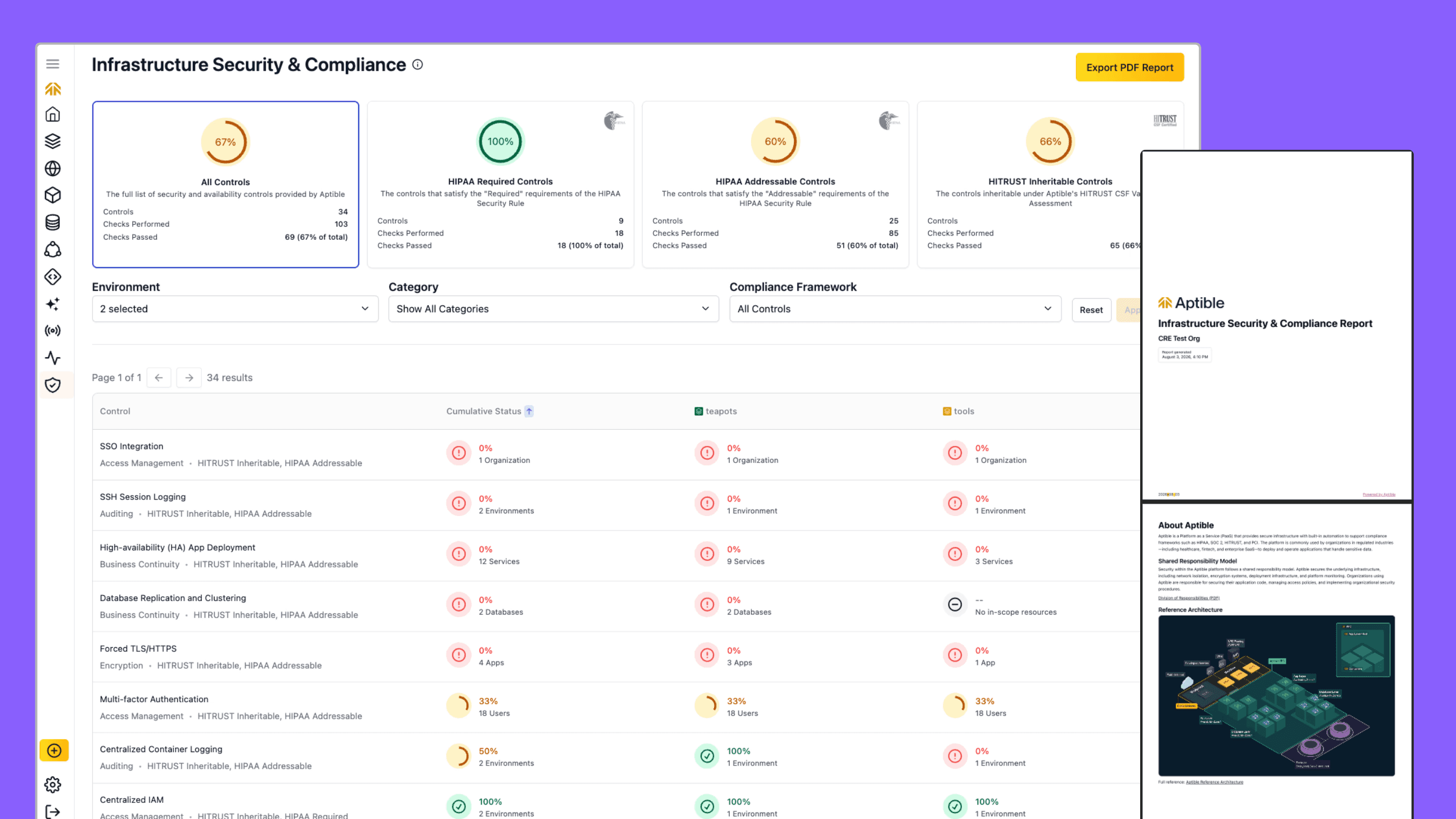
We are happy to announce that the Security & Compliance Dashboard has been fully migrated to the new UI, closing one of the last remaining gaps in our legacy-to-new-dashboard transition.
The dashboard is live now. You'll see the Security & Compliance Dashboard in the new UI automatically, no action needed on your end.
How we used agentic coding to speed up execution, and its pitfalls
Most of the new app-ui rollout has been straightforward: pull a page from the old Ember app, rebuild it against the same Ruby backend, and ship it.
The Security & Compliance Dashboard was a different scale of job. It's dense with controls, checks, and a report export that customers depend on for audits, and rebuilding all of that by hand meant a lot of careful, unglamorous frontend work.
All the actual compliance logic, the checks, the pass/fail determinations, and the data that ends up in a customer's audit live in the Rails backend and were staying exactly as they were. The dashboard's network and access boundaries weren't changing either; this was a port within app-ui's existing setup, not a new deployment with its own set of infrastructure decisions to make.
That's exactly what made it a good fit for agentic coding, and it's the same principle we lean on everywhere in our client and API interactions: a clear contract between the backend and the frontend means most of what changes in a UI rewrite is presentation, not logic. Because that contract holds, frontend changes come with a lower risk of security or reliability issues, whether a person is making them or an agent is. The frontend port was, structurally, a lower-risk job: take an existing page, translate it into React, and hand it off to Claude (which runs behind our LLM Gateway).
The initial port went well. Claude handled translating the Ember views into React components without much friction, and having all the important logic locked in the backend meant there wasn't much room for it to get the substance wrong. That first pass took a fraction of the time a manual rebuild would have.
A clean API contract doesn't protect you from everything, though. It safeguards against most security and reliability issues, but it has nothing to say about codebase quality or whether the result feels consistent to a customer. That's a separate problem, and it's the one we actually had to manage by hand.
Left on its own, Claude will often lean toward building a new component rather than reusing one that already exists. Point it at a design, and you'll often end up with a mix of reused and new components that don't exactly align with your instructions.
The reason this project worked well anyway is that we already have an extensive frontend component library that we built and maintain. That gave Claude something concrete to reuse instead of reinvent, and gave us something concrete to hold the output to. Without a design system to point to, "more consistent" isn't really an option Claude can reach for on its own; even with one, it takes a reviewer being meticulous about explicitly calling out reuse every round, or you end up quietly forking your design system one component at a time.
That's also, in our view, the more durable argument for investing in a design system in the first place. It's not just fewer inconsistent buttons across your product. It's more reusable code and a more consistent customer experience, and it's what makes agentic coding a lower-risk way to work through a frontend rewrite instead of a shortcut that trades one kind of technical debt for another. We think there's more room to get better at this in future agentic coding work, but a real design system is the foundation that makes the rest of it worth trying.
The results
The faster port gave us the momentum to start focusing our attention where it really mattered: improving the UX. A fast port on its own would have been worth it, but it also opened the door to a real upgrade for the dashboard:
Faster performance. The new UI is more performant than the legacy Ember app, so the move improved load times with no additional backend work.
A completely refreshed report. The exportable report that customers use for audits was rebuilt, not just carried over, into something cleaner and more useful than the original.
Better components. The page now uses tools that didn't exist when the original dashboard was built, including the advanced filtering introduced with Activity audit log filtering and an improved datatable.
More accurate controls. We used the migration as a checkpoint to audit the existing controls, rather than assuming legacy behavior was correct and porting it as-is.
Getting started with the dashboard
The Security & Compliance Dashboard is already live in the new UI for all organizations. Head to the Dashboard and open Security & Compliance to see it.
For more information, check out the docs.
Until today, the Security & Compliance Dashboard lived in Aptible's legacy UI, an Ember app that's been running since we first built the feature. It's one of the most heavily used parts of the product: customers lean on it heavily when reviewing their compliance posture, especially early in onboarding or during an audit, and it's stayed mostly untouched on the frontend since it shipped. Everything else moved to our new dashboard (built in React and TypeScript, under the hood, we call app-ui) except this one.
We are happy to announce that the Security & Compliance Dashboard has been fully migrated to the new UI, closing one of the last remaining gaps in our legacy-to-new-dashboard transition.
The dashboard is live now. You'll see the Security & Compliance Dashboard in the new UI automatically, no action needed on your end.
How we used agentic coding to speed up execution, and its pitfalls
Most of the new app-ui rollout has been straightforward: pull a page from the old Ember app, rebuild it against the same Ruby backend, and ship it.
The Security & Compliance Dashboard was a different scale of job. It's dense with controls, checks, and a report export that customers depend on for audits, and rebuilding all of that by hand meant a lot of careful, unglamorous frontend work.
All the actual compliance logic, the checks, the pass/fail determinations, and the data that ends up in a customer's audit live in the Rails backend and were staying exactly as they were. The dashboard's network and access boundaries weren't changing either; this was a port within app-ui's existing setup, not a new deployment with its own set of infrastructure decisions to make.
That's exactly what made it a good fit for agentic coding, and it's the same principle we lean on everywhere in our client and API interactions: a clear contract between the backend and the frontend means most of what changes in a UI rewrite is presentation, not logic. Because that contract holds, frontend changes come with a lower risk of security or reliability issues, whether a person is making them or an agent is. The frontend port was, structurally, a lower-risk job: take an existing page, translate it into React, and hand it off to Claude (which runs behind our LLM Gateway).
The initial port went well. Claude handled translating the Ember views into React components without much friction, and having all the important logic locked in the backend meant there wasn't much room for it to get the substance wrong. That first pass took a fraction of the time a manual rebuild would have.
A clean API contract doesn't protect you from everything, though. It safeguards against most security and reliability issues, but it has nothing to say about codebase quality or whether the result feels consistent to a customer. That's a separate problem, and it's the one we actually had to manage by hand.
Left on its own, Claude will often lean toward building a new component rather than reusing one that already exists. Point it at a design, and you'll often end up with a mix of reused and new components that don't exactly align with your instructions.
The reason this project worked well anyway is that we already have an extensive frontend component library that we built and maintain. That gave Claude something concrete to reuse instead of reinvent, and gave us something concrete to hold the output to. Without a design system to point to, "more consistent" isn't really an option Claude can reach for on its own; even with one, it takes a reviewer being meticulous about explicitly calling out reuse every round, or you end up quietly forking your design system one component at a time.
That's also, in our view, the more durable argument for investing in a design system in the first place. It's not just fewer inconsistent buttons across your product. It's more reusable code and a more consistent customer experience, and it's what makes agentic coding a lower-risk way to work through a frontend rewrite instead of a shortcut that trades one kind of technical debt for another. We think there's more room to get better at this in future agentic coding work, but a real design system is the foundation that makes the rest of it worth trying.
The results
The faster port gave us the momentum to start focusing our attention where it really mattered: improving the UX. A fast port on its own would have been worth it, but it also opened the door to a real upgrade for the dashboard:
Faster performance. The new UI is more performant than the legacy Ember app, so the move improved load times with no additional backend work.
A completely refreshed report. The exportable report that customers use for audits was rebuilt, not just carried over, into something cleaner and more useful than the original.
Better components. The page now uses tools that didn't exist when the original dashboard was built, including the advanced filtering introduced with Activity audit log filtering and an improved datatable.
More accurate controls. We used the migration as a checkpoint to audit the existing controls, rather than assuming legacy behavior was correct and porting it as-is.
Getting started with the dashboard
The Security & Compliance Dashboard is already live in the new UI for all organizations. Head to the Dashboard and open Security & Compliance to see it.
For more information, check out the docs.
Related posts
More on this topic from the Aptible blog.
More on this topic from the Aptible blog.


548 Market St #75826 San Francisco, CA 94104
© 2026. All rights reserved. Privacy Policy
548 Market St #75826 San Francisco, CA 94104
© 2026. All rights reserved. Privacy Policy
548 Market St #75826 San Francisco, CA 94104
© 2026. All rights reserved. Privacy Policy