
Overview
Model Access Policies let you control which models are available for use with LLM Keys. The policy is configured once for your organization and applies to every LLM key in it.Organization-Level Policy
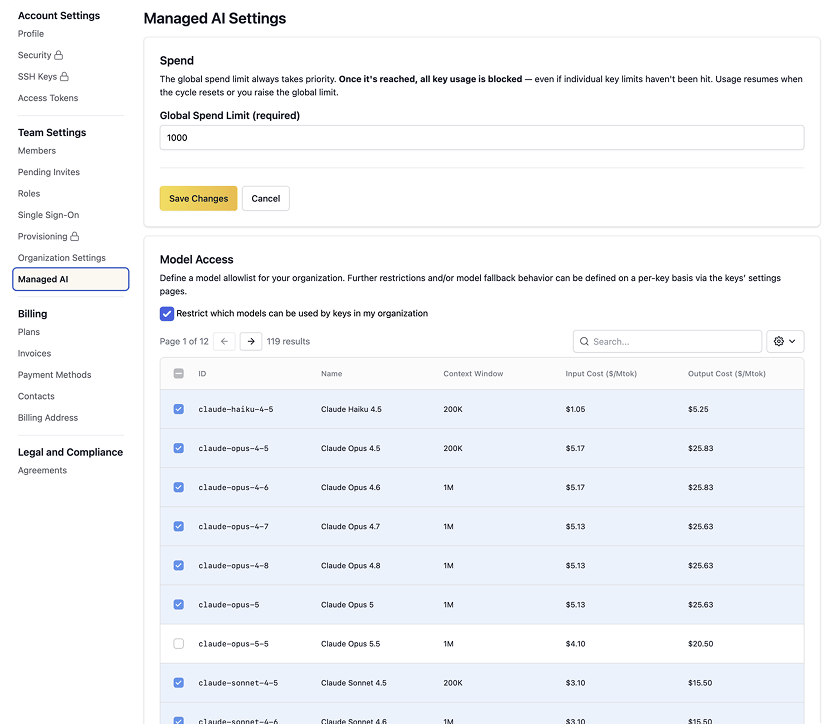
Your organization has a single allowlist of models available to all LLM keys. Any model not on the list is blocked for every key. This gives Account Owners centralized control over model usage across your applications and developers, without needing to configure access per key or per application. To configure your model access policy:- Go to Settings > Managed AI in the Aptible dashboard
- Turn on Restrict which models can be used by keys in my organization
- Select the models you want to allow
Changing your organization’s model access policy requires the Account Owner role.
Model availability is subject to change. See Supported Models for the current list of available models.