> ## Documentation Index
> Fetch the complete documentation index at: https://www.aptible.com/docs/llms.txt
> Use this file to discover all available pages before exploring further.
# Grants
> Scope which tools each user or agent can call using grants.
## Overview
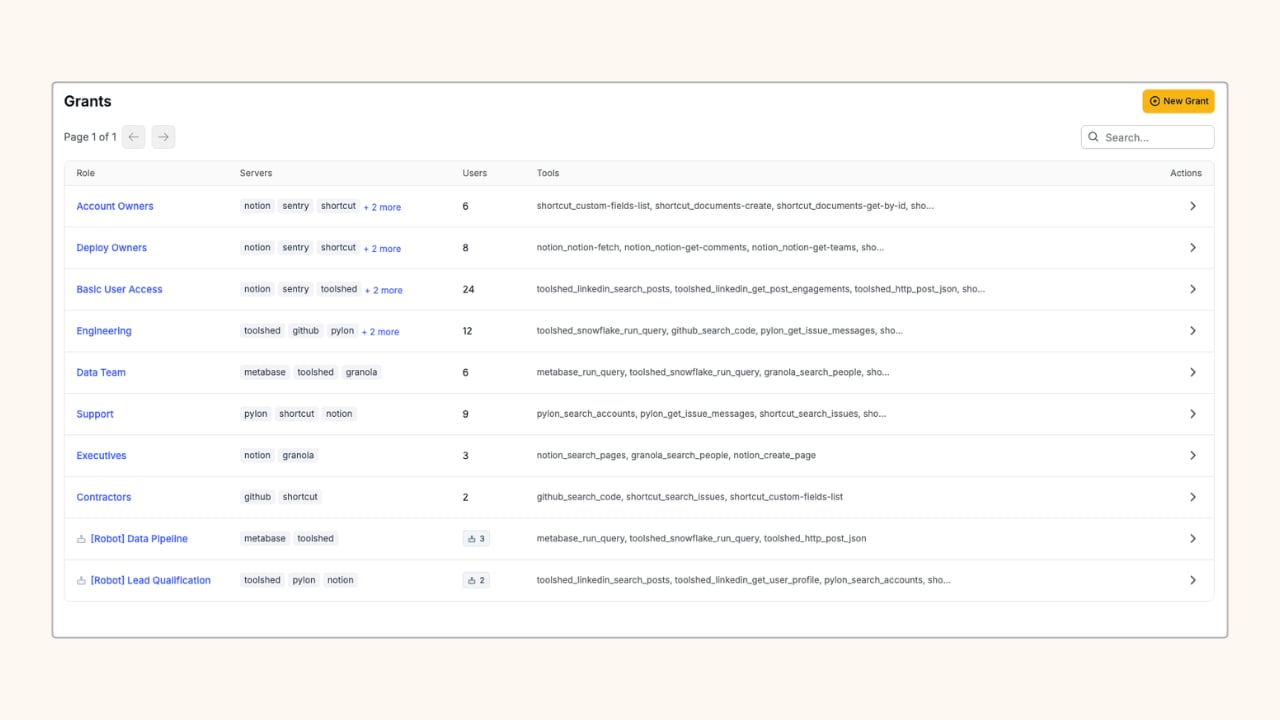
A grant is the record that authorizes a set of members to call a specific set of tools. If no grant exists for a caller on a given tool, the call is rejected. There is no implicit access.
Account Owner or Admin permission is required to create and manage grants.
A grant has two parts:
* **Users & Robots:** the people and automated accounts attached to the grant
* **Tools Allowed:** the specific tools members can call, selected per server
 ## Create a Grant
In the Aptible dashboard, navigate to **MCP > Grants** and click **New Grant**.
Enter a **Grant Name** that describes the scope (e.g. `GitHub (Eng)`, `Toolshed (Owners)`).
Under **Users & Robots**, search for and select the members who should receive this grant. Both user accounts and robot accounts appear in this list.
Under **Tools Allowed**, expand the servers you want to include. Select individual tools, or check **Select all tools (wildcard \*)** to allow all current and future tools on that server. Click **Save** to apply the grant.
Tools are grouped by server and by category (e.g. read-only vs. write). The count badge next to each server shows how many tools are selected out of how many are available.
## Related
Create robots and API keys to add to your grants.
See every tool call made by grant members.
## Create a Grant
In the Aptible dashboard, navigate to **MCP > Grants** and click **New Grant**.
Enter a **Grant Name** that describes the scope (e.g. `GitHub (Eng)`, `Toolshed (Owners)`).
Under **Users & Robots**, search for and select the members who should receive this grant. Both user accounts and robot accounts appear in this list.
Under **Tools Allowed**, expand the servers you want to include. Select individual tools, or check **Select all tools (wildcard \*)** to allow all current and future tools on that server. Click **Save** to apply the grant.
Tools are grouped by server and by category (e.g. read-only vs. write). The count badge next to each server shows how many tools are selected out of how many are available.
## Related
Create robots and API keys to add to your grants.
See every tool call made by grant members.