> ## Documentation Index
> Fetch the complete documentation index at: https://www.aptible.com/docs/llms.txt
> Use this file to discover all available pages before exploring further.
# Audit Logging
> Review every tool call that flows through the MCP Gateway.
## Overview
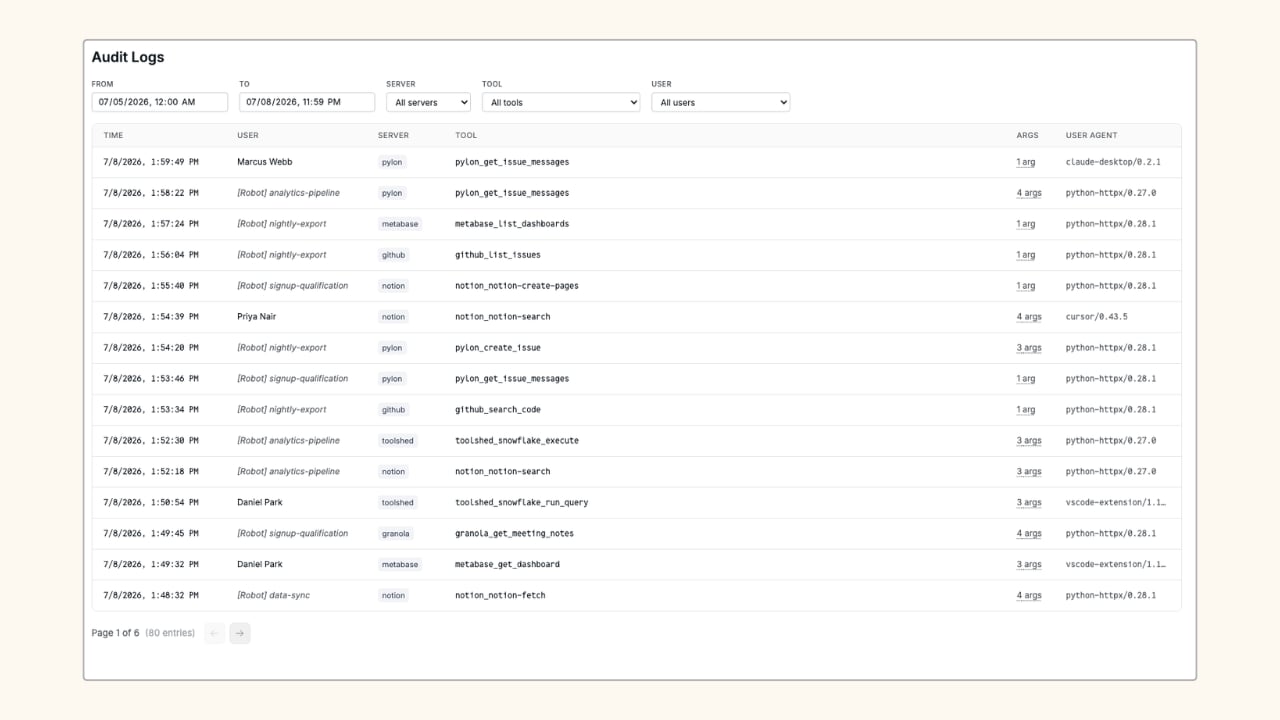 Every tool call routed through the MCP Gateway is logged automatically. No configuration required.
In the Aptible dashboard, navigate to **MCP > Audit Logs**.
Account owners can see all tool calls across the organization. End users see only their own activity.
## What Gets Logged
Each log entry captures:
* **Time:** when the call was made
* **Server:** the server the tool belongs to
* **Tool:** the full namespaced tool name (e.g. `github_get_file_contents`)
* **Args:** the number of arguments passed (arguments are stored encrypted)
* **User Agent:** the MCP client making the request
Arguments are stored encrypted at rest. The log entry shows the argument count; the full argument values are available when you expand a row.
## Filter Logs
Use the filter controls at the top of the page to narrow the log view:
* **From / To:** date and time range pickers
* **Server:** dropdown to filter to a specific server
* **Tool:** dropdown to filter to a specific tool
## Retention and Export
Audit logs are retained within the dashboard. To export logs or send them to an external destination for long-term retention, [contact Aptible Support](https://app.aptible.com/support).
## Related
Control which tools each user or agent can call.
Manage the users, robots, and API keys that appear in logs.
Every tool call routed through the MCP Gateway is logged automatically. No configuration required.
In the Aptible dashboard, navigate to **MCP > Audit Logs**.
Account owners can see all tool calls across the organization. End users see only their own activity.
## What Gets Logged
Each log entry captures:
* **Time:** when the call was made
* **Server:** the server the tool belongs to
* **Tool:** the full namespaced tool name (e.g. `github_get_file_contents`)
* **Args:** the number of arguments passed (arguments are stored encrypted)
* **User Agent:** the MCP client making the request
Arguments are stored encrypted at rest. The log entry shows the argument count; the full argument values are available when you expand a row.
## Filter Logs
Use the filter controls at the top of the page to narrow the log view:
* **From / To:** date and time range pickers
* **Server:** dropdown to filter to a specific server
* **Tool:** dropdown to filter to a specific tool
## Retention and Export
Audit logs are retained within the dashboard. To export logs or send them to an external destination for long-term retention, [contact Aptible Support](https://app.aptible.com/support).
## Related
Control which tools each user or agent can call.
Manage the users, robots, and API keys that appear in logs.