> ## Documentation Index
> Fetch the complete documentation index at: https://www.aptible.com/docs/llms.txt
> Use this file to discover all available pages before exploring further.
# Database Backups
> Learn how Aptible snapshot backups, retention policies, and restore workflows protect your managed databases.
# Overview
Aptible provides several backup and recovery features for managed databases:
* Automatic daily backups
* Manual backups
* Cross-region copy backups
* Final backups for deprovisioned databases
* [Point-in-Time Recovery (PITR) for PostgreSQL](/core-concepts/managed-databases/managing-databases/point-in-time-recovery)
All backups are compressed and encrypted. Snapshot-style backups are configured through the Environment's backup retention policy.
## How Backups Work
Aptible database backups are volume snapshots of the underlying database storage. Each snapshot is a read-only copy of the database volume captured when the backup is taken.
Once a snapshot is created, its contents do not change. You can restore, copy, or purge the snapshot according to the configured policy, but the backup itself remains immutable.
## Automatic Backups
By default, Aptible creates an automatic backup of each database every 24 hours. Retention is controlled by the Environment's backup retention policy.
The policy includes these settings:
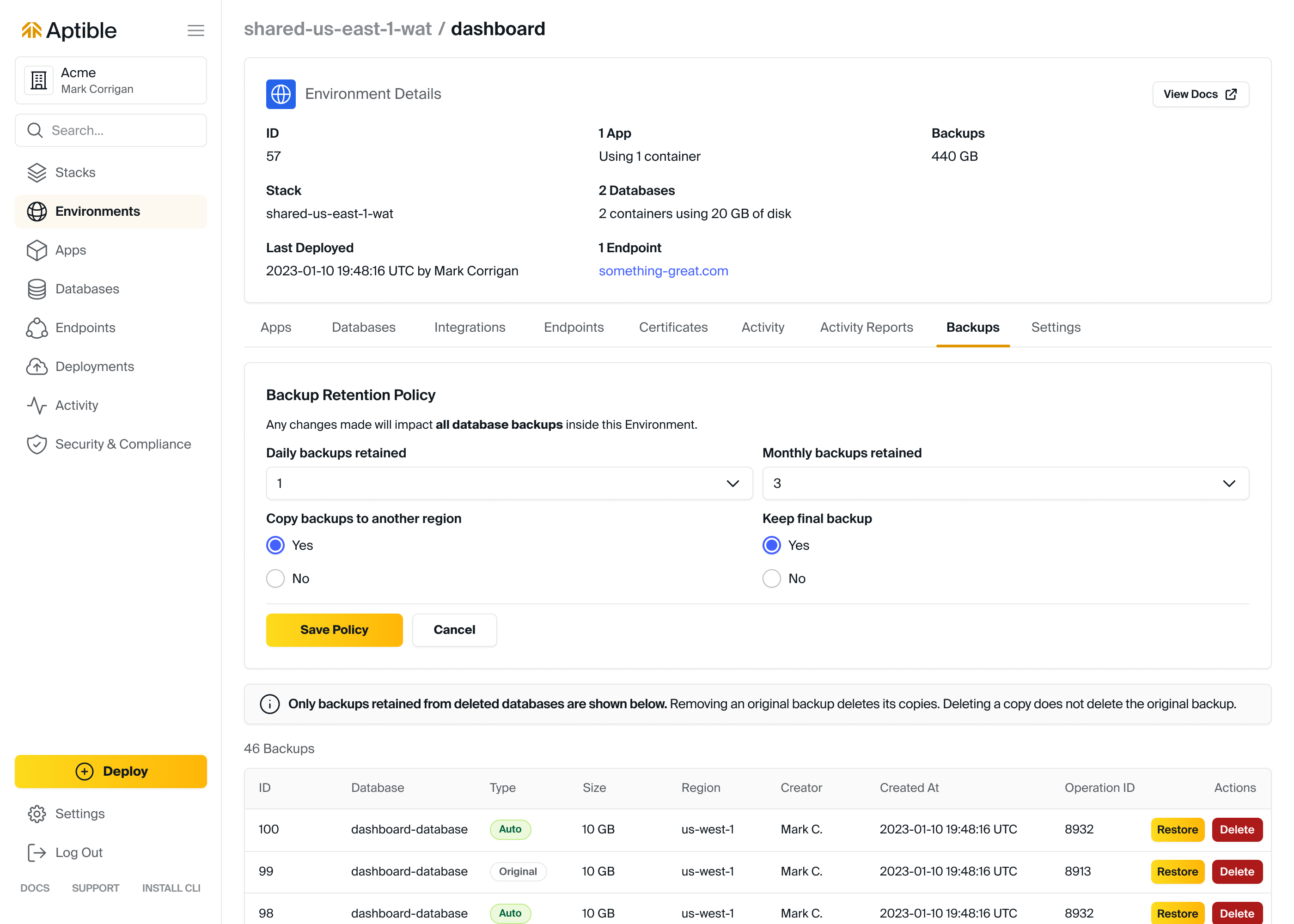
* **Daily backups retained**: Number of daily backups retained. Default: `30`
* **Monthly backups retained**: Number of monthly backups retained, using the last backup of each month. Default: `12`
* **Yearly backups retained**: Number of yearly backups retained, using the last backup of each year. Default: `6`
* **Copy backups to another region**: Whether Aptible copies backups in the Environment to another region. Default: disabled
* **Keep final backup for deprovisioned databases**: Whether Aptible keeps a final backup when a database is deprovisioned. Default: enabled
* **Point-in-time Recovery for PostgreSQL**: Whether PITR retention is enabled for supported PostgreSQL databases. Default: Enabled
* **Days of PITR data retained**: How many days of PostgreSQL WAL data are retained for PITR. Default: `1`
**Recommended backup retention policies**
**Production environments:** Daily backups retained: 14-30, Monthly backups retained: 12, Yearly backups retained: 5, Copy backups to another region: enabled as needed for DR, Keep final backup for deprovisioned databases: enabled
**Non-production environments:** Daily backups retained: 1-14, Monthly backups retained: 0, Yearly backups retained: 0, Copy backups to another region: disabled, Keep final backup for deprovisioned databases: disabled
## Backup Retention Policy for Automated Backups
Automatic backup retention and PostgreSQL PITR retention are configured at the Environment level through a shared backup retention policy.
You can modify the backup retention policy in these ways:
* In the Aptible Dashboard:
* Select the Environment
* Select the **Backups** tab
* Using the [`aptible backup_retention_policy:set`](/reference/aptible-cli/cli-commands/cli-backup-retention-policy-set) CLI command
* Using the Aptible [Terraform Provider](https://registry.terraform.io/providers/aptible/aptible/latest/docs)
PITR retention appears in the Dashboard as **Point-in-time Recovery for PostgreSQL** and **Days of PITR data retained**. These PITR controls are not self-service configurable today. The current visible values are **Enabled** and **1**. If you need longer retention, contact [Aptible Support](/how-to-guides/troubleshooting/aptible-support). For current PITR prerequisites, states, and restore guidance, see [Point-in-Time Recovery (PITR)](/core-concepts/managed-databases/managing-databases/point-in-time-recovery).
Reducing retained backups, PITR data retention, cross-region copies, or final backups automatically deletes backup data that no longer matches the policy. This can permanently remove recovery data and may violate your organization's internal compliance controls.
**Cost optimization tip:** [See this related blog for more recommendations for balancing continuity and costs](https://www.aptible.com/blog/backup-strategies-on-aptible-balancing-continuity-and-costs)
## Retention and Disposal
### Cross-region Copy Backups
When `COPY BACKUPS TO ANOTHER REGION` is enabled, Aptible copies backups in that Environment to a secondary region.
Cross-region copy backups improve redundancy for disaster recovery. To improve recovery time objective (RTO), consider maintaining a secondary Stack in the destination region so you can restore more quickly during a regional outage.
The current cross-region mapping is:
Aptible guarantees that data processing and storage occur only within the US for US Stacks and within the EU for EU Stacks.
| Originating region | Destination region(s) |
| :----------------- | :----------------------------- |
| us-east-1 | us-west-1, us-west-2 |
| us-east-2 | us-west-1, us-west-2 |
| us-west-1 | us-east-1 |
| us-west-2 | us-east-1 |
| sa-east-1 | us-east-2 |
| ca-central-1 | ca-west-1 (formerly us-east-2) |
| eu-west-1 | eu-central-1 |
| eu-west-2 | eu-central-1 |
| eu-west-3 | eu-central-1 |
| eu-central-1 | eu-west-1 |
| ap-northeast-1 | ap-northeast-2 |
| ap-northeast-2 | ap-northeast-1 |
| ap-southeast-1 | ap-northeast-2, ap-southeast-2 |
| ap-southeast-2 | ap-southeast-4 |
| ap-south-1 | ap-southeast-2 |
### Final Backups
When `KEEP FINAL BACKUP` is enabled, Aptible creates and retains one final backup when a database is deprovisioned. Final backups remain available as long as the Environment continues to retain them under policy.
We strongly recommend enabling final backups for production Environments.
### Excluding a Database from New Automatic Backups
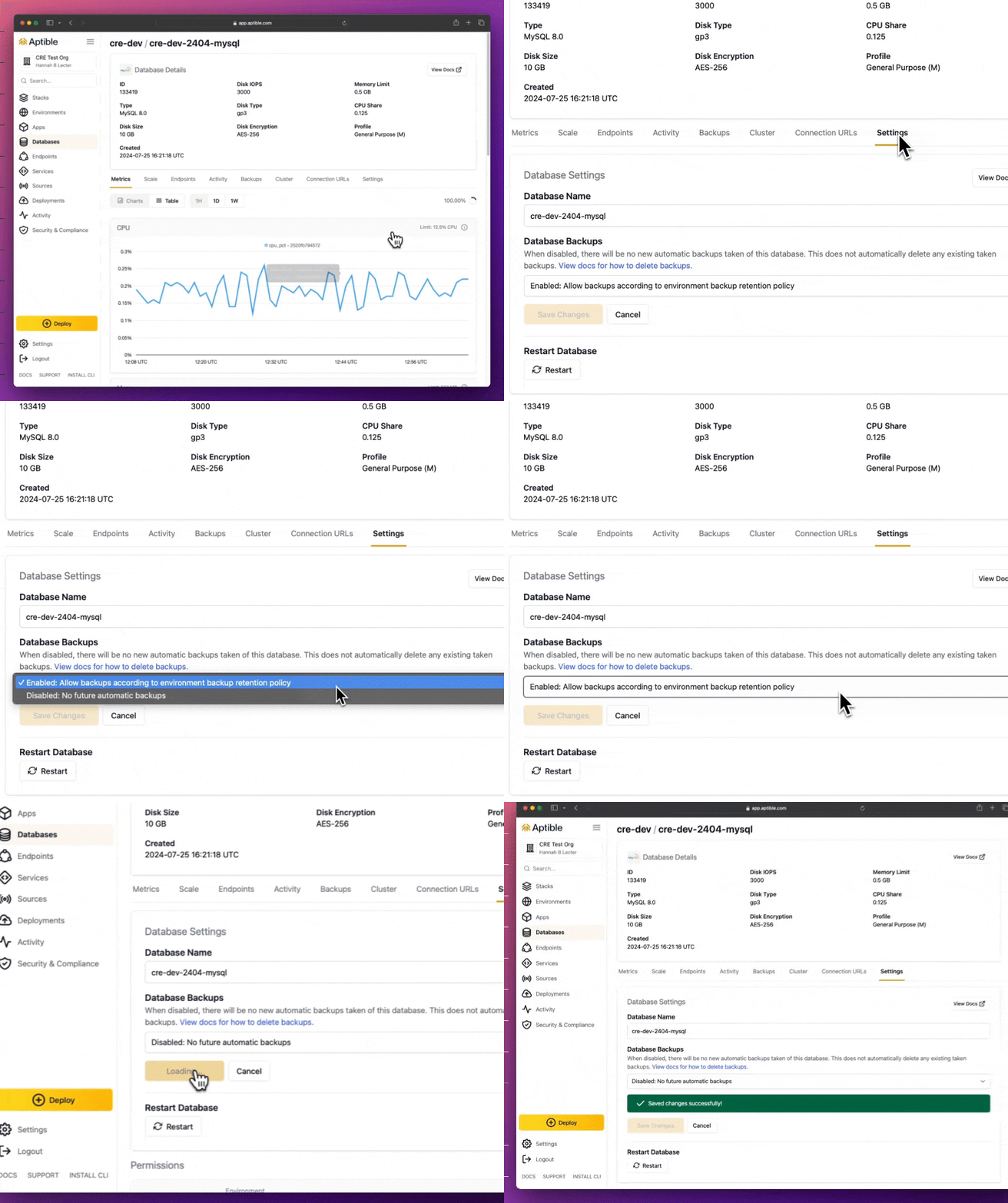 You can exclude an individual database from new automatic backups in the Aptible Dashboard from the database's **Settings** tab, or through the Aptible Terraform Provider.
If you disable backups for a database:
* Aptible stops taking new automatic backups for that database
* Aptible does not create a final backup during deprovisioning, even if the Environment policy normally retains final backups
* Existing backups are not deleted automatically
To purge older backups yourself:
* Use [`aptible backup:list DB_HANDLE`](/reference/aptible-cli/cli-commands/cli-backup-list) to identify backups
* Use [`aptible backup:purge BACKUP_ID`](/reference/aptible-cli/cli-commands/cli-backup-purge) to delete them
* Or export output as JSON:
```bash theme={null}
APTIBLE_OUTPUT_FORMAT=json aptible backup:list DB_HANDLE
```
## Manual Backups
Manual backups can be created at any time and are retained until you explicitly delete them, even after the source database is deprovisioned.
## Purging Backups
Automatic backups are permanently deleted when the associated database is deprovisioned unless retained as final backups. Final backups and cross-region copies that no longer match policy are also purged automatically. This cleanup process can take up to 1 hour.
You can also manually delete individual backups.
## Restoring from a Backup
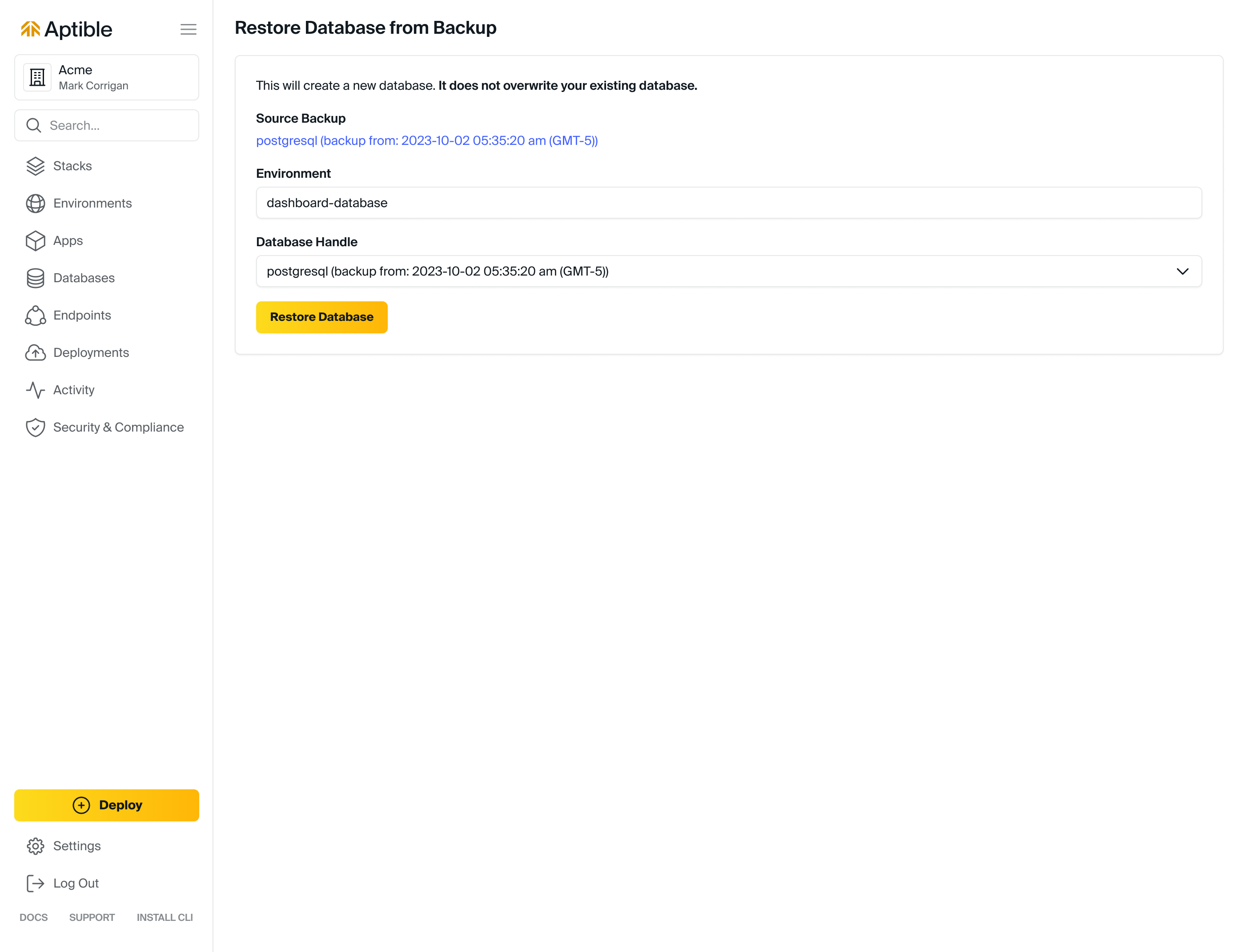
Restoring from a backup creates a new database from the backed-up data. It does not replace or modify the source database.
By default, restored databases are created as a 1 GB [General Purpose (M) Container Profile](/core-concepts/scaling/container-profiles#default-container-profile), though you can specify container size and profile with [`aptible backup:restore`](/reference/aptible-cli/cli-commands/cli-backup-restore).
Databases backups are stored as EBS snapshots. Databases restored from a backup can initially have degraded disk performance, as described in AWS's ["Restoring from an Amazon EBS snapshot" documentation](https://docs.aws.amazon.com/prescriptive-guidance/latest/backup-recovery/restore.html). If you are using a restored database for performance testing, run the test twice: once to warm the restored volume, and a second time to measure steady-state performance. Restoring in the same region as the original backup generally minimizes initialization time.
If you have special retention needs, such as a litigation hold, contact [Aptible Support](/how-to-guides/troubleshooting/aptible-support).
## Point-in-Time Recovery for PostgreSQL
Point-in-Time Recovery (PITR) is a feature available specifically for Aptible Managed **PostgreSQL** databases, allowing recovery to specific points in time, independent of automated, scheduled backups.
Visit the dedicated [Point-in-Time Recovery (PITR)](/core-concepts/managed-databases/managing-databases/point-in-time-recovery) page to learn how to make the most of this feature.
## Encryption
Aptible's built-in [Database Encryption](/core-concepts/managed-databases/managing-databases/database-encryption/overview) applies automatically to backups of a given database.
## FAQ
Backup retention policies can be modified in one of these ways:
* Within the Aptible Dashboard:
* Select the Environment
* Select the **Backups** tab
* Using the [`aptible backup_retention_policy:set`](/reference/aptible-cli/cli-commands/cli-backup-retention-policy-set) CLI command
* Using the Aptible [Terraform Provider](https://registry.terraform.io/providers/aptible/aptible/latest/docs)
You can exclude an individual database from new automatic backups in the Aptible Dashboard from the database's **Settings** tab, or through the Aptible Terraform Provider.
If you disable backups for a database:
* Aptible stops taking new automatic backups for that database
* Aptible does not create a final backup during deprovisioning, even if the Environment policy normally retains final backups
* Existing backups are not deleted automatically
To purge older backups yourself:
* Use [`aptible backup:list DB_HANDLE`](/reference/aptible-cli/cli-commands/cli-backup-list) to identify backups
* Use [`aptible backup:purge BACKUP_ID`](/reference/aptible-cli/cli-commands/cli-backup-purge) to delete them
* Or export output as JSON:
```bash theme={null}
APTIBLE_OUTPUT_FORMAT=json aptible backup:list DB_HANDLE
```
## Manual Backups
Manual backups can be created at any time and are retained until you explicitly delete them, even after the source database is deprovisioned.
## Purging Backups
Automatic backups are permanently deleted when the associated database is deprovisioned unless retained as final backups. Final backups and cross-region copies that no longer match policy are also purged automatically. This cleanup process can take up to 1 hour.
You can also manually delete individual backups.
## Restoring from a Backup
Restoring from a backup creates a new database from the backed-up data. It does not replace or modify the source database.
By default, restored databases are created as a 1 GB [General Purpose (M) Container Profile](/core-concepts/scaling/container-profiles#default-container-profile), though you can specify container size and profile with [`aptible backup:restore`](/reference/aptible-cli/cli-commands/cli-backup-restore).
Databases backups are stored as EBS snapshots. Databases restored from a backup can initially have degraded disk performance, as described in AWS's ["Restoring from an Amazon EBS snapshot" documentation](https://docs.aws.amazon.com/prescriptive-guidance/latest/backup-recovery/restore.html). If you are using a restored database for performance testing, run the test twice: once to warm the restored volume, and a second time to measure steady-state performance. Restoring in the same region as the original backup generally minimizes initialization time.
If you have special retention needs, such as a litigation hold, contact [Aptible Support](/how-to-guides/troubleshooting/aptible-support).
## Point-in-Time Recovery for PostgreSQL
Point-in-Time Recovery (PITR) is a feature available specifically for Aptible Managed **PostgreSQL** databases, allowing recovery to specific points in time, independent of automated, scheduled backups.
Visit the dedicated [Point-in-Time Recovery (PITR)](/core-concepts/managed-databases/managing-databases/point-in-time-recovery) page to learn how to make the most of this feature.
## Encryption
Aptible's built-in [Database Encryption](/core-concepts/managed-databases/managing-databases/database-encryption/overview) applies automatically to backups of a given database.
## FAQ
Backup retention policies can be modified in one of these ways:
* Within the Aptible Dashboard:
* Select the Environment
* Select the **Backups** tab
* Using the [`aptible backup_retention_policy:set`](/reference/aptible-cli/cli-commands/cli-backup-retention-policy-set) CLI command
* Using the Aptible [Terraform Provider](https://registry.terraform.io/providers/aptible/aptible/latest/docs)
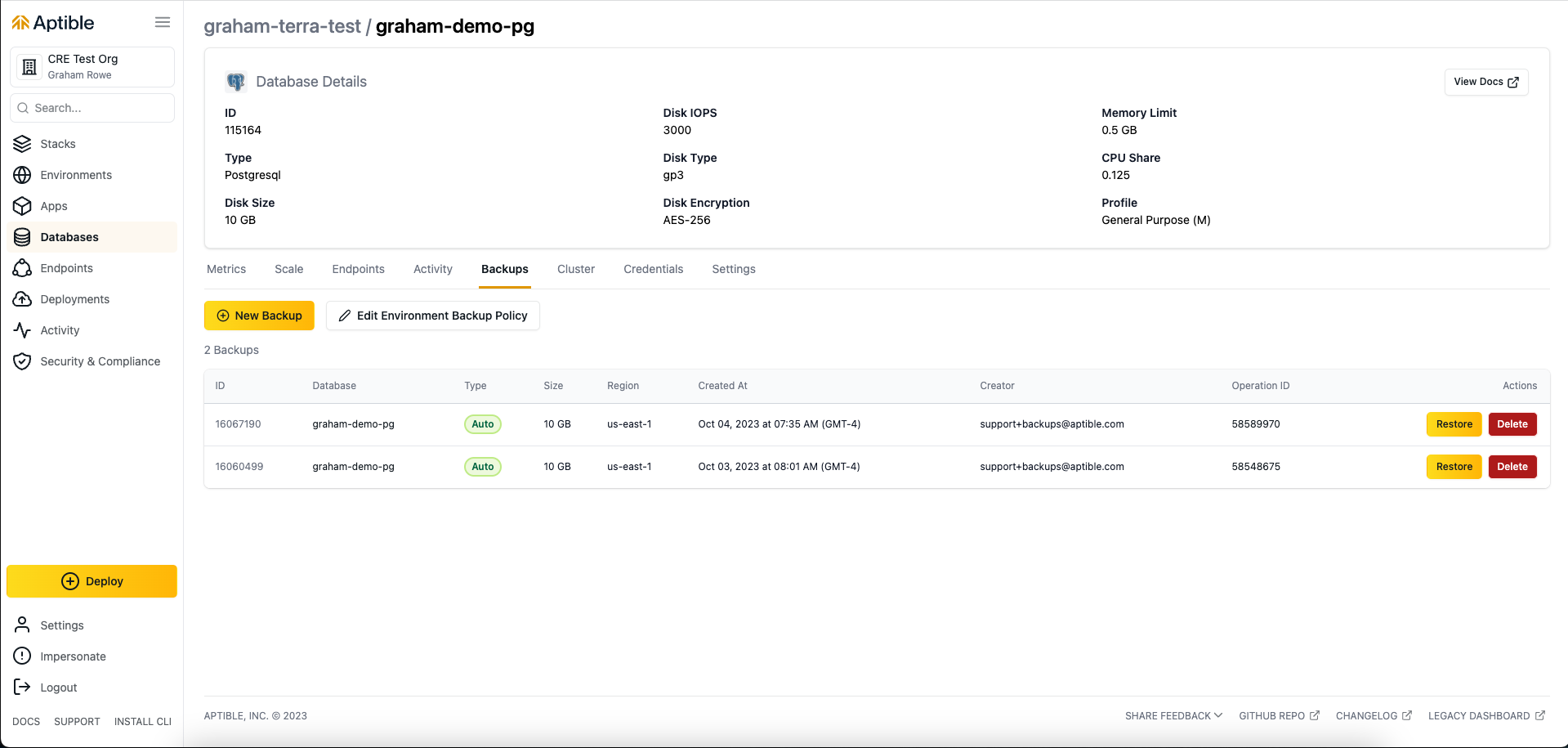
 You can view automatic backups in two ways:
* Using the [`aptible backup:list`](/reference/aptible-cli/cli-commands/cli-backup-list) command
* Within the Aptible Dashboard by navigating to the database's **Backups** tab
Final backups can be viewed in two ways:
* Using the [`aptible backup:orphaned`](/reference/aptible-cli/cli-commands/cli-backup-orphaned) command
* Within the Aptible Dashboard by navigating to the Environment's **Backup Management** tab and selecting **Retained Backups of Deleted Databases**
Manual backups can be created in two ways:
* Using the [`aptible db:backup`](/reference/aptible-cli/cli-commands/cli-db-backup) command
* Within the Aptible Dashboard by navigating to the database's **Backup Management** tab and selecting **Create Backup**
Backups can be deleted in these ways:
* Using the [`aptible backup:purge`](/reference/aptible-cli/cli-commands/cli-backup-purge) command
* For active databases, in the Aptible Dashboard:
* Navigate to the Environment
* Select the database
* Select the **Backups** tab
* Select **Permanently remove this backup** for the backup you want to delete
* For deprovisioned databases, in the Aptible Dashboard:
* Navigate to the Environment
* Select the **Backup Management** tab
* Select **Delete** for the backup you want to remove
You can view automatic backups in two ways:
* Using the [`aptible backup:list`](/reference/aptible-cli/cli-commands/cli-backup-list) command
* Within the Aptible Dashboard by navigating to the database's **Backups** tab
Final backups can be viewed in two ways:
* Using the [`aptible backup:orphaned`](/reference/aptible-cli/cli-commands/cli-backup-orphaned) command
* Within the Aptible Dashboard by navigating to the Environment's **Backup Management** tab and selecting **Retained Backups of Deleted Databases**
Manual backups can be created in two ways:
* Using the [`aptible db:backup`](/reference/aptible-cli/cli-commands/cli-db-backup) command
* Within the Aptible Dashboard by navigating to the database's **Backup Management** tab and selecting **Create Backup**
Backups can be deleted in these ways:
* Using the [`aptible backup:purge`](/reference/aptible-cli/cli-commands/cli-backup-purge) command
* For active databases, in the Aptible Dashboard:
* Navigate to the Environment
* Select the database
* Select the **Backups** tab
* Select **Permanently remove this backup** for the backup you want to delete
* For deprovisioned databases, in the Aptible Dashboard:
* Navigate to the Environment
* Select the **Backup Management** tab
* Select **Delete** for the backup you want to remove
 * Navigate to the database
* Select the **Settings** tab
* Choose **Disabled: No new backups allowed** within **Database Backups**
A typical production policy might look like this:
* Yearly backups retained: 0-6
* Monthly backups retained: 3-12
* Daily backups retained: 15-60
A typical non-production policy might look like this:
* Yearly backups retained: 0
* Monthly backups retained: 0-1
* Daily backups retained: 1-7
To optimize costs, it is usually best to disable cross-region copy backups and final backups in non-production environments.
You can restore a backup in these ways:
* Using the [`aptible backup:restore`](/reference/aptible-cli/cli-commands/cli-backup-restore) command
* For active databases, within the Aptible Dashboard:
* Navigate to the Environment
* Select the database
* Select the **Backups** tab
* Select **Restore to a New Database** from the backup you want to restore
* For deprovisioned databases, within the Aptible Dashboard:
* Navigate to the Environment
* Select the **Backup Management** tab
* Select **Restore to a New Database** for the backup you want to restore
* Navigate to the database
* Select the **Settings** tab
* Choose **Disabled: No new backups allowed** within **Database Backups**
A typical production policy might look like this:
* Yearly backups retained: 0-6
* Monthly backups retained: 3-12
* Daily backups retained: 15-60
A typical non-production policy might look like this:
* Yearly backups retained: 0
* Monthly backups retained: 0-1
* Daily backups retained: 1-7
To optimize costs, it is usually best to disable cross-region copy backups and final backups in non-production environments.
You can restore a backup in these ways:
* Using the [`aptible backup:restore`](/reference/aptible-cli/cli-commands/cli-backup-restore) command
* For active databases, within the Aptible Dashboard:
* Navigate to the Environment
* Select the database
* Select the **Backups** tab
* Select **Restore to a New Database** from the backup you want to restore
* For deprovisioned databases, within the Aptible Dashboard:
* Navigate to the Environment
* Select the **Backup Management** tab
* Select **Restore to a New Database** for the backup you want to restore