> ## Documentation Index
> Fetch the complete documentation index at: https://www.aptible.com/docs/llms.txt
> Use this file to discover all available pages before exploring further.
# Billing & Payments
> Learn how manage billing & payments within Aptible
# Overview
To review or modify your billing information, navigate to your account settings within the Aptible Dashboard and select the appropriate option from the Billing section of the navigation.
# Navigating Billing
Most billing actions are restricted to *Account Owners*. To grant billing access to non-owners, like Finance team members, add them to the [Billing-Only Role](/core-concepts/security-compliance/access-permissions#billing-only). This role provides access to billing tasks without access to Aptible resources.
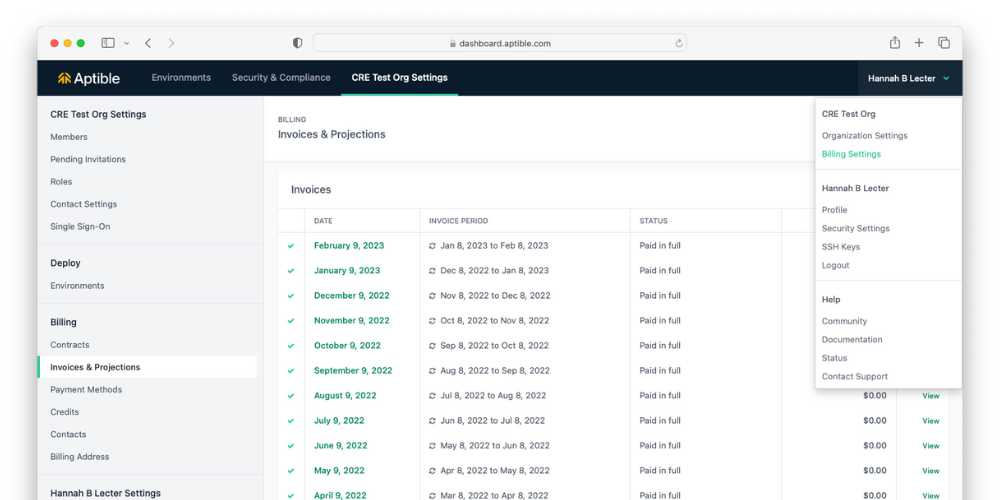 The following information and settings are available under each section:
* Plans: View and manage your plan.
* Contracts: View a list of your billing contracts, if any.
* Invoices & Projections: View historical invoices and your projected future invoices based on current usage patterns.
* Payment Methods: Add or update a payment method.
* Credits: View credits applied to your account.
* Contacts: Manage billing contacts who receive a copy of your invoices by email.
* Billing Address: Set your billing address.
Aptible uses billing address information to determine your sales tax withholding per your local (state, county, city) tax rates.
# FAQ
Follow these steps to upgrade your account to the Production plan:
* In the Aptible Dashboard, select **Settings**
* Select **Plans**
The following information and settings are available under each section:
* Plans: View and manage your plan.
* Contracts: View a list of your billing contracts, if any.
* Invoices & Projections: View historical invoices and your projected future invoices based on current usage patterns.
* Payment Methods: Add or update a payment method.
* Credits: View credits applied to your account.
* Contacts: Manage billing contacts who receive a copy of your invoices by email.
* Billing Address: Set your billing address.
Aptible uses billing address information to determine your sales tax withholding per your local (state, county, city) tax rates.
# FAQ
Follow these steps to upgrade your account to the Production plan:
* In the Aptible Dashboard, select **Settings**
* Select **Plans**
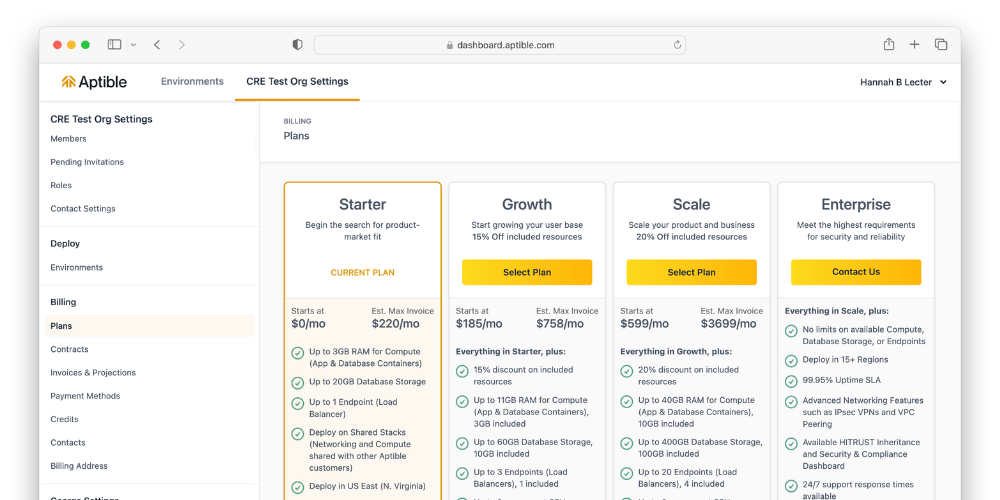 To upgrade to Enterprise, [contact Aptible Support.](https://app.aptible.com/support)
Follow these steps to downgrade your account to the Development or Production plan:
* In the Aptible dashboard, select your name at the top right
* Select Billing Settings in the dropdown that appears
* On the left, select Plan
* Choose the plan you would like to downgrade to
Please note that your active resources must match the limits of the plan you select for the downgrade to succeed. For example: if you downgrade to a plan that only includes up to 3GB RAM - you must scale your resources below 3GB RAM before you can successfully downgrade.
* All plans: Credit Card and ACH Debit
* Enterprise plan: Credit Card, ACH Credit, ACH Debit, Wire, Bill.com, Custom Arrangement
* Credit Card and ACH Debit: In the Aptible dashboard, select your name at the top right > select Billing Settings in the dropdown that appears > select Payment Methods on the left.
* Enterprise plan only: ACH Credit, Wire, Bill.com, Custom Arrangement: Please contact [Aptible Support](/how-to-guides/troubleshooting/aptible-support) to make necessary updates.
Invoices can become overdue for several reasons:
* A card is expired
* Payment was declined
* There is no payment method on file
Aptible suspends accounts with invoices overdue for more than 14 days. If an invoice is unpaid for over 30 days, Aptible will shut down your account.
[Contact Aptible Support](/how-to-guides/troubleshooting/aptible-support) to request a "Detailed Invoice Breakdown Report."
Yes, we offer volume discounts for paying upfront annually. [Contact Aptible Support](/how-to-guides/troubleshooting/aptible-support) to request volume pricing.
Please refer to [Cancel my account](/how-to-guides/platform-guides/cancel-aptible-account) for more information.
Billing contacts receive copies of monthly invoices in their email. Only [Account Owners](/core-concepts/security-compliance/access-permissions#account-owners) can add billing contacts. Add billing contacts using these steps:
* In the Aptible dashboard, select your name at the top right
* Select Billing Settings in the dropdown that appears
* On the left, select Contacts
To upgrade to Enterprise, [contact Aptible Support.](https://app.aptible.com/support)
Follow these steps to downgrade your account to the Development or Production plan:
* In the Aptible dashboard, select your name at the top right
* Select Billing Settings in the dropdown that appears
* On the left, select Plan
* Choose the plan you would like to downgrade to
Please note that your active resources must match the limits of the plan you select for the downgrade to succeed. For example: if you downgrade to a plan that only includes up to 3GB RAM - you must scale your resources below 3GB RAM before you can successfully downgrade.
* All plans: Credit Card and ACH Debit
* Enterprise plan: Credit Card, ACH Credit, ACH Debit, Wire, Bill.com, Custom Arrangement
* Credit Card and ACH Debit: In the Aptible dashboard, select your name at the top right > select Billing Settings in the dropdown that appears > select Payment Methods on the left.
* Enterprise plan only: ACH Credit, Wire, Bill.com, Custom Arrangement: Please contact [Aptible Support](/how-to-guides/troubleshooting/aptible-support) to make necessary updates.
Invoices can become overdue for several reasons:
* A card is expired
* Payment was declined
* There is no payment method on file
Aptible suspends accounts with invoices overdue for more than 14 days. If an invoice is unpaid for over 30 days, Aptible will shut down your account.
[Contact Aptible Support](/how-to-guides/troubleshooting/aptible-support) to request a "Detailed Invoice Breakdown Report."
Yes, we offer volume discounts for paying upfront annually. [Contact Aptible Support](/how-to-guides/troubleshooting/aptible-support) to request volume pricing.
Please refer to [Cancel my account](/how-to-guides/platform-guides/cancel-aptible-account) for more information.
Billing contacts receive copies of monthly invoices in their email. Only [Account Owners](/core-concepts/security-compliance/access-permissions#account-owners) can add billing contacts. Add billing contacts using these steps:
* In the Aptible dashboard, select your name at the top right
* Select Billing Settings in the dropdown that appears
* On the left, select Contacts