> ## Documentation Index
> Fetch the complete documentation index at: https://www.aptible.com/docs/llms.txt
> Use this file to discover all available pages before exploring further.

# Apps

<Frame>
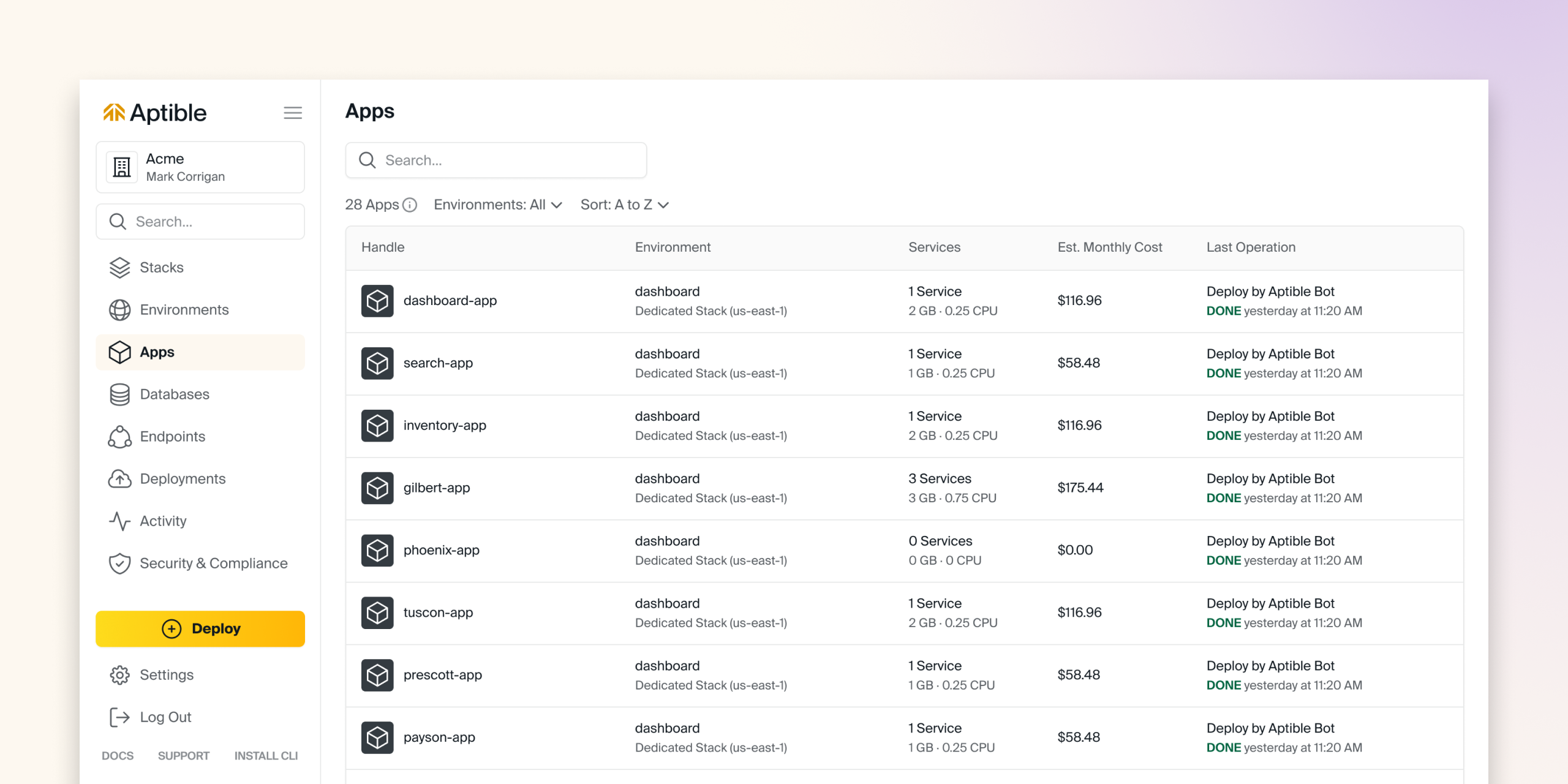
  <img src="https://mintcdn.com/aptible/nHu__nJZoe7eO21-/images/Apps---Overview.png?fit=max&auto=format&n=nHu__nJZoe7eO21-&q=85&s=c8433c408ac7f4383ba12cae8c389558" alt="Apps Overview" width="1280" height="720" data-path="images/Apps---Overview.png" />
</Frame>

## What is an Aptible App?

An Aptible App is a containerized web application. Aptible Apps have the following compatibility requirements:

* Apps run on Linux in Docker containers
* Apps only receive traffic over HTTP or TCP

Apps do not have persistent storage by default. To store your data with persistence, we recommend using a [Database](/docs/core-concepts/managed-databases/overview) or third-party storage solution, such as [AWS S3](/docs/how-to-guides/app-guides/use-s3-to-accept-file-uploads). For workloads that need a small amount of durable local state, you can attach a [Persistent Disk](/docs/core-concepts/apps/persistent-disks) to a single-container App service.

Like [Aptible's general architecture](/docs/core-concepts/architecture/overview), Apps run on EC2 instances under the hood, which is why containers can be distributed across separate Availability Zones for scaling and high availability, covered below.

Apps are made up of three components:

* **[An Image](/docs/core-concepts/apps/deploying-apps/image/overview):** Deploy directly from a Docker image, or push your code to Aptible with `git push` and the platform will build a Docker image for you.
* **[Services](/docs/core-concepts/apps/deploying-apps/services):** Services define how many containers Aptible will start for your app, what command they will run, and their Memory and CPU Limits. A single App can define multiple Services for different roles, such as `web`, `worker`, `cmd`, or `cron`, each running and scaling independently.
* **[Configuration](/docs/core-concepts/apps/deploying-apps/configuration) (optional):** The configuration is a set of keys and values securely passed to the containers as environment variables. For example - secrets are passed as configurations.

## Explore Starter Templates

<CardGroup cols={3}>
  <Card title="Deploy your code" icon="globe" href="https://www.aptible.com/docs/custom-code-quickstart">
    <Badge color="gray">Custom Code</Badge>
  </Card>

  <Card title="Ruby Template" href="https://www.aptible.com/docs/ruby-quickstart" icon={<svg width="30" height="30" viewBox="0 0 256 255" xmlns="http://www.w3.org/2000/svg"><path d="M197.467 167.764l-145.52 86.41 188.422-12.787L254.88 51.393l-57.414 116.37z" fill="#CC342D"/><path d="M240.677 241.257L224.482 129.48l-44.113 58.25 60.308 53.528z" fill="#A11401"/><path d="M240.896 241.257l-118.646-9.313-69.674 21.986 188.32-12.673z" fill="#A11401"/><path d="M52.744 253.955l29.64-97.1L17.16 170.8l35.583 83.154z" fill="#E05A4D"/><path d="M180.358 188.05L153.085 81.226l-78.047 73.16 105.32 33.666z" fill="#CC342D"/><path d="M248.693 82.73l-73.777-60.256-20.544 66.418 94.321-6.162z" fill="#E05A4D"/><path d="M214.191.99L170.8 24.97 143.424.669l70.767.322z" fill="#CC342D"/><path d="M2.496 129.48l14.794 41.963 64.283-14.422 73.39-68.207 20.712-65.787L143.063 0 87.618 20.75C70.149 37 36.252 69.146 35.03 69.75c-1.21.618-22.384 40.639-32.534 59.73z" fill="#fff"/><path d="M54.442 54.094c37.86-37.538 86.667-59.716 105.397-40.818 18.72 18.898-1.132 64.823-38.992 102.349-37.86 37.525-86.062 60.925-104.78 42.027-18.73-18.885.515-66.032 38.375-103.558z" fill="#CC342D"/><path d="M52.744 253.916l29.408-97.409 97.665 31.376c-35.312 33.113-74.587 61.106-127.073 66.033z" fill="#9B1209"/><path d="M155.092 88.622l25.073 99.313c29.498-31.016 55.972-64.36 68.938-105.603l-94.01 6.29z" fill="#AA1401"/><path d="M248.847 82.833c10.035-30.282 12.35-73.725-34.966-81.791l-38.825 21.445 73.791 60.346z" fill="#B31000"/><path d="M0 202.935c1.39 49.979 37.448 50.724 52.808 51.162l-35.48-82.86L0 202.935z" fill="#9E1209"/></svg>}>
    <Badge color="gray">Sample Code</Badge>
  </Card>

  <Card
    title="NodeJS Template"
    href="https://www.aptible.com/docs/node-js-quickstart"
    icon={
<svg xmlns="http://www.w3.org/2000/svg" width="30" height="30" viewBox="0 0 58 64" fill="none">
<path d="M26.3201 0.681001C27.9201 -0.224999 29.9601 -0.228999 31.5201 0.681001L55.4081 14.147C56.9021 14.987 57.9021 16.653 57.8881 18.375V45.375C57.8981 47.169 56.8001 48.871 55.2241 49.695L31.4641 63.099C30.6514 63.5481 29.7333 63.7714 28.8052 63.7457C27.877 63.7201 26.9727 63.4463 26.1861 62.953L19.0561 58.833C18.5701 58.543 18.0241 58.313 17.6801 57.843C17.9841 57.435 18.5241 57.383 18.9641 57.203C19.9561 56.887 20.8641 56.403 21.7761 55.891C22.0061 55.731 22.2881 55.791 22.5081 55.935L28.5881 59.451C29.0221 59.701 29.4621 59.371 29.8341 59.161L53.1641 45.995C53.4521 45.855 53.6121 45.551 53.5881 45.235V18.495C53.6201 18.135 53.4141 17.807 53.0881 17.661L29.3881 4.315C29.2515 4.22054 29.0894 4.16976 28.9234 4.16941C28.7573 4.16905 28.5951 4.21912 28.4581 4.313L4.79207 17.687C4.47207 17.833 4.25207 18.157 4.29207 18.517V45.257C4.26407 45.573 4.43207 45.871 4.72207 46.007L11.0461 49.577C12.2341 50.217 13.6921 50.577 15.0001 50.107C15.5725 49.8913 16.0652 49.5058 16.4123 49.0021C16.7594 48.4984 16.9443 47.9007 16.9421 47.289L16.9481 20.709C16.9201 20.315 17.2921 19.989 17.6741 20.029H20.7141C21.1141 20.019 21.4281 20.443 21.3741 20.839L21.3681 47.587C21.3701 49.963 20.3941 52.547 18.1961 53.713C15.4881 55.113 12.1401 54.819 9.46407 53.473L2.66407 49.713C1.06407 48.913 -0.00993076 47.185 6.9243e-05 45.393V18.393C0.0067219 17.5155 0.247969 16.6557 0.698803 15.9027C1.14964 15.1498 1.79365 14.5312 2.56407 14.111L26.3201 0.681001ZM33.2081 19.397C36.6621 19.197 40.3601 19.265 43.4681 20.967C45.8741 22.271 47.2081 25.007 47.2521 27.683C47.1841 28.043 46.8081 28.243 46.4641 28.217C45.4641 28.215 44.4601 28.231 43.4561 28.211C43.0301 28.227 42.7841 27.835 42.7301 27.459C42.4421 26.179 41.7441 24.913 40.5401 24.295C38.6921 23.369 36.5481 23.415 34.5321 23.435C33.0601 23.515 31.4781 23.641 30.2321 24.505C29.2721 25.161 28.9841 26.505 29.3261 27.549C29.6461 28.315 30.5321 28.561 31.2541 28.789C35.4181 29.877 39.8281 29.789 43.9141 31.203C45.6041 31.787 47.2581 32.923 47.8381 34.693C48.5941 37.065 48.2641 39.901 46.5781 41.805C45.2101 43.373 43.2181 44.205 41.2281 44.689C38.5821 45.279 35.8381 45.293 33.1521 45.029C30.6261 44.741 27.9981 44.077 26.0481 42.357C24.3801 40.909 23.5681 38.653 23.6481 36.477C23.6681 36.109 24.0341 35.853 24.3881 35.883H27.3881C27.7921 35.855 28.0881 36.203 28.1081 36.583C28.2941 37.783 28.7521 39.083 29.8161 39.783C31.8681 41.107 34.4421 41.015 36.7901 41.053C38.7361 40.967 40.9201 40.941 42.5101 39.653C43.3501 38.919 43.5961 37.693 43.3701 36.637C43.1241 35.745 42.1701 35.331 41.3701 35.037C37.2601 33.737 32.8001 34.209 28.7301 32.737C27.0781 32.153 25.4801 31.049 24.8461 29.351C23.9601 26.951 24.3661 23.977 26.2321 22.137C28.0321 20.307 30.6721 19.601 33.1721 19.349L33.2081 19.397Z" fill="#8CC84B"/></svg>
}
  >
    <Badge color="gray">Sample Code</Badge>
  </Card>

  <Card
    title="Django Template"
    href="https://www.aptible.com/docs/python-quickstart"
    icon={
<svg width="30" height="30" viewBox="0 0 256 326" xmlns="http://www.w3.org/2000/svg" preserveAspectRatio="xMinYMin meet"><g fill="#2BA977"><path d="M114.784 0h53.278v244.191c-27.29 5.162-47.38 7.193-69.117 7.193C33.873 251.316 0 222.245 0 166.412c0-53.795 35.93-88.708 91.608-88.708 8.64 0 15.222.68 23.176 2.717V0zm1.867 124.427c-6.24-2.038-11.382-2.717-17.965-2.717-26.947 0-42.512 16.437-42.512 45.243 0 28.046 14.88 43.532 42.17 43.532 5.896 0 10.696-.332 18.307-1.351v-84.707z"/><path d="M255.187 84.26v122.263c0 42.105-3.154 62.353-12.411 79.81-8.64 16.783-20.022 27.366-43.541 39.055l-49.438-23.297c23.519-10.93 34.901-20.588 42.17-35.327 7.61-15.072 10.01-32.529 10.01-78.445V84.261h53.21zM196.608 0h53.278v54.135h-53.278V0z"/></g></svg>
}
  >
    <Badge color="gray">Sample Code</Badge>
  </Card>

  <Card
    title="Laravel Template"
    href="https://www.aptible.com/docs/php-quickstart"
    icon={
<svg height="30" viewBox="0 -.11376601 49.74245785 51.31690859" width="30" xmlns="http://www.w3.org/2000/svg"><path d="m49.626 11.564a.809.809 0 0 1 .028.209v10.972a.8.8 0 0 1 -.402.694l-9.209 5.302v10.509c0 .286-.152.55-.4.694l-19.223 11.066c-.044.025-.092.041-.14.058-.018.006-.035.017-.054.022a.805.805 0 0 1 -.41 0c-.022-.006-.042-.018-.063-.026-.044-.016-.09-.03-.132-.054l-19.219-11.066a.801.801 0 0 1 -.402-.694v-32.916c0-.072.01-.142.028-.21.006-.023.02-.044.028-.067.015-.042.029-.085.051-.124.015-.026.037-.047.055-.071.023-.032.044-.065.071-.093.023-.023.053-.04.079-.06.029-.024.055-.05.088-.069h.001l9.61-5.533a.802.802 0 0 1 .8 0l9.61 5.533h.002c.032.02.059.045.088.068.026.02.055.038.078.06.028.029.048.062.072.094.017.024.04.045.054.071.023.04.036.082.052.124.008.023.022.044.028.068a.809.809 0 0 1 .028.209v20.559l8.008-4.611v-10.51c0-.07.01-.141.028-.208.007-.024.02-.045.028-.068.016-.042.03-.085.052-.124.015-.026.037-.047.054-.071.024-.032.044-.065.072-.093.023-.023.052-.04.078-.06.03-.024.056-.05.088-.069h.001l9.611-5.533a.801.801 0 0 1 .8 0l9.61 5.533c.034.02.06.045.09.068.025.02.054.038.077.06.028.029.048.062.072.094.018.024.04.045.054.071.023.039.036.082.052.124.009.023.022.044.028.068zm-1.574 10.718v-9.124l-3.363 1.936-4.646 2.675v9.124l8.01-4.611zm-9.61 16.505v-9.13l-4.57 2.61-13.05 7.448v9.216zm-36.84-31.068v31.068l17.618 10.143v-9.214l-9.204-5.209-.003-.002-.004-.002c-.031-.018-.057-.044-.086-.066-.025-.02-.054-.036-.076-.058l-.002-.003c-.026-.025-.044-.056-.066-.084-.02-.027-.044-.05-.06-.078l-.001-.003c-.018-.03-.029-.066-.042-.1-.013-.03-.03-.058-.038-.09v-.001c-.01-.038-.012-.078-.016-.117-.004-.03-.012-.06-.012-.09v-21.483l-4.645-2.676-3.363-1.934zm8.81-5.994-8.007 4.609 8.005 4.609 8.006-4.61-8.006-4.608zm4.164 28.764 4.645-2.674v-20.096l-3.363 1.936-4.646 2.675v20.096zm24.667-23.325-8.006 4.609 8.006 4.609 8.005-4.61zm-.801 10.605-4.646-2.675-3.363-1.936v9.124l4.645 2.674 3.364 1.937zm-18.422 20.561 11.743-6.704 5.87-3.35-8-4.606-9.211 5.303-8.395 4.833z" fill="#ff2d20"/></svg>
}
  >
    <Badge color="gray">Sample Code</Badge>
  </Card>

  <Card title="Python Template" href="https://www.aptible.com/docs/deploy-demo-app" icon={<svg width="30" height="30" viewBox="0 0 256 255" xmlns="http://www.w3.org/2000/svg"><path d="M126.916.072c-64.832 0-60.784 28.115-60.784 28.115l.072 29.128h61.868v8.745H41.631S.145 61.355.145 126.77c0 65.417 36.21 63.097 36.21 63.097h21.61v-30.356s-1.165-36.21 35.632-36.21h61.362s34.475.557 34.475-33.319V33.97S194.67.072 126.916.072zM92.802 19.66a11.12 11.12 0 0 1 11.13 11.13 11.12 11.12 0 0 1-11.13 11.13 11.12 11.12 0 0 1-11.13-11.13 11.12 11.12 0 0 1 11.13-11.13z" fill="#3776AB"/><path d="M128.757 254.126c64.832 0 60.784-28.115 60.784-28.115l-.072-29.127H127.6v-8.745h86.441s41.486 4.705 41.486-60.712c0-65.416-36.21-63.096-36.21-63.096h-21.61v30.355s1.165 36.21-35.632 36.21h-61.362s-34.475-.557-34.475 33.32v56.013s-5.235 33.897 62.518 33.897zm34.114-19.586a11.12 11.12 0 0 1-11.13-11.13 11.12 11.12 0 0 1 11.13-11.131 11.12 11.12 0 0 1 11.13 11.13 11.12 11.12 0 0 1-11.13 11.13z" fill="#FFD43B"/></svg>}>
    <Badge color="gray">Sample Code</Badge>
  </Card>
</CardGroup>

## Deployments

Aptible's Apps are designed for easy deployment and simplified management for developers. You can deploy code via [Git](/docs/core-concepts/apps/deploying-apps/image/deploying-with-git/overview), [Docker Image](/docs/core-concepts/apps/deploying-apps/image/deploying-with-docker-image/overview), and [CI/CD integration](/docs/how-to-guides/app-guides/how-to-deploy-aptible-ci-cd).

The process is similar regardless of method:

* You define your [Services](/docs/core-concepts/apps/deploying-apps/services) and [Configuration](/docs/core-concepts/apps/deploying-apps/configuration) (such as environment variables)
* Aptible provisions the underlying infrastructure securely and reliably

### Rollbacks

When things go wrong with deployments, Aptible makes it easy to restore your App to a good state:

* **[Automatic Rollbacks](/docs/core-concepts/architecture/operations#operation-rollbacks)**: When an infrastructure failure occurs, Aptible automatically restores your App to its last known good state.
* **[Instant Rollbacks](/docs/core-concepts/apps/deploying-apps/releases/rollbacks)**: Roll back to any previous Release on demand right from the Aptible Dashboard, restoring its exact container image without a new deploy.

### Zero-Downtime Deployments

Services with an [HTTP(S) Endpoint](/docs/core-concepts/apps/connecting-to-apps/app-endpoints/https-endpoints/overview#zero-downtime-deployment) deploy with zero downtime by default: new containers start accepting traffic before the old ones shut down. Services without an Endpoint can opt into the same cutover behavior; see [Releases](/docs/core-concepts/apps/deploying-apps/releases/overview) for how to enable it and for the health check requirements.

<Note>Services with an attached [Persistent Disk](/docs/core-concepts/apps/persistent-disks) can't deploy with zero downtime. The disk only mounts into one container at a time, so these deploys briefly stop the existing container before starting the new one.</Note>

### High Availability

Scale any App to [two or more containers](/docs/core-concepts/scaling/app-scaling#high-availability-apps), and Aptible automatically deploys it in a high-availability configuration: containers are distributed across separate AWS Availability Zones and deployed with zero downtime. There's no extra setup, HA comes standard the moment you cross that container count.

<Note>Services with an attached [Persistent Disk](/docs/core-concepts/apps/persistent-disks) are an exception: they run on a single container and incur a brief interruption on every deploy.</Note>

## Scaling

### Scale on Demand

Scale on demand by setting your [container count](/docs/core-concepts/scaling/app-scaling#horizontal-scaling), and adjust CPU/RAM by selecting a [Container Profile](/docs/core-concepts/scaling/container-profiles) to change the ratio. Aptible offers three Container Profiles: General Purpose, CPU-Optimized, and Memory Optimized.

Aptible also provides [in-app recommendations](/docs/core-concepts/scaling/container-efficiency-recommendations) for scaling, which flag when a Service is under- or over-provisioned and suggest the most optimal Container Profile and size.

### Advanced Autoscaling

Aptible also supports advanced autoscaling:

* [Horizontal autoscaling](/docs/core-concepts/scaling/app-scaling#horizontal-autoscaling) adds and removes containers automatically as demand changes, or <Tooltip tip="Coming soon. Contact Aptible support to gain early access.">on a schedule</Tooltip>.
* [Vertical autoscaling](/docs/core-concepts/scaling/app-scaling#vertical-autoscaling) adjusts a container's CPU/RAM without you having to resize it manually.

## Connectivity

### Public/Private Access

Configure your App's Endpoint for public or private access. A [Public URL](/docs/core-concepts/apps/connecting-to-apps/app-endpoints/overview) exposes your App to the internet, with traffic automatically load-balanced across all containers for the service. You can optionally add an [IP allowlist](/docs/core-concepts/apps/connecting-to-apps/app-endpoints/ip-filtering) to restrict which clients are allowed to connect. For private access, expose an [Internal Endpoint](/docs/core-concepts/apps/connecting-to-apps/app-endpoints/overview#endpoint-placement) to your [Stack](/docs/core-concepts/architecture/stacks)'s internal network instead, for cases where only other services on your Stack should reach the App.

## Ephemeral SSH Sessions

Create an [Ephemeral SSH Session](/docs/core-concepts/apps/connecting-to-apps/ssh-sessions) configured identically to your App containers. Ephemeral SSH Sessions are great for debugging, one-off scripts, and running ad-hoc jobs, without needing to modify a running Service just to get a shell.

## Learn more using Apps on Aptible

<CardGroup cols={3}>
  <Card title="Deploying Apps" icon="book" iconType="duotone" href="https://www.aptible.com/docs/core-concepts/apps/deploying-apps/overview">
    Learn to deploy your code into Apps with an image, Services, and Configuration
  </Card>

  <Card title="Connecting to Apps" icon="book" iconType="duotone" href="https://www.aptible.com/docs/core-concepts/apps/connecting-to-apps/overview">
    Learn to expose your App to the internet with Endpoints and connect with ephemeral SSH sessions
  </Card>

  <Card title="Managing Apps" icon="book" iconType="duotone" href="https://www.aptible.com/docs/core-concepts/apps/managing-apps">
    Learn to scale, restart, rename, restart, and delete your Apps
  </Card>
</CardGroup>