> ## Documentation Index
> Fetch the complete documentation index at: https://www.aptible.com/docs/llms.txt
> Use this file to discover all available pages before exploring further.
# Rollbacks
> Undo a failed operation automatically, or manually re-release the exact container image from an earlier deployment.
## Overview
In the event that things go wrong with a deployment, Aptible makes it easy to restore an App to a previous deployment.
If there's a failure in the underlying infrastructure, Aptible automatically restores your App to its last known good state. If you want to roll back manually, for example because the last deployment introduced a bug, you can initiate a rollback from the Aptible Dashboard.
There are two types of rollbacks:
* **Automatic**: Aptible detects a failure during a deployment operation, including failures in the underlying infrastructure (for example, an EC2 instance failing), and automatically restores your App to its last known good state.
* **Manual**: you pick a previous successful deployment from the Dashboard and Aptible restores that deployment's image.
In both cases, Aptible restores the exact previous container image. There is no checkout, build, or code scan, so a rollback is much faster than a normal deploy. Nothing is rebuilt.
## Automatic Rollbacks
Aptible detects a failure during a deployment operation, including failures in the underlying infrastructure (for example, an EC2 instance failing), and automatically restores your App to its last known good state.
Unlike a manual rollback, an automatic rollback does not create a new deployment operation. Aptible continues to use the initial deployment operation and displays related messaging in the operation logs.
If your deployment ran a [`before_release`](/docs/core-concepts/apps/deploying-apps/releases/aptible-yml#before-release) command (for example, a database migration), that command's effects remain in place even after the rollback.
See [Operation Rollbacks](/docs/core-concepts/architecture/operations#operation-rollbacks).
## Manual Rollbacks
Like automatic rollbacks, a manual rollback releases the exact image from the deployment you selected, so the code that runs is identical to the code that ran then. However, unlike an automatic rollback, a manual rollback has more consideration with regard to data.
**Rollback reverts code and configuration. It does not revert data.**
It won't undo a migration, restore deleted rows, or revert a [Persistent Disk](/docs/core-concepts/apps/persistent-disks). Confirm the version you're returning to can still run against your current schema.
### Rollback lifecycle
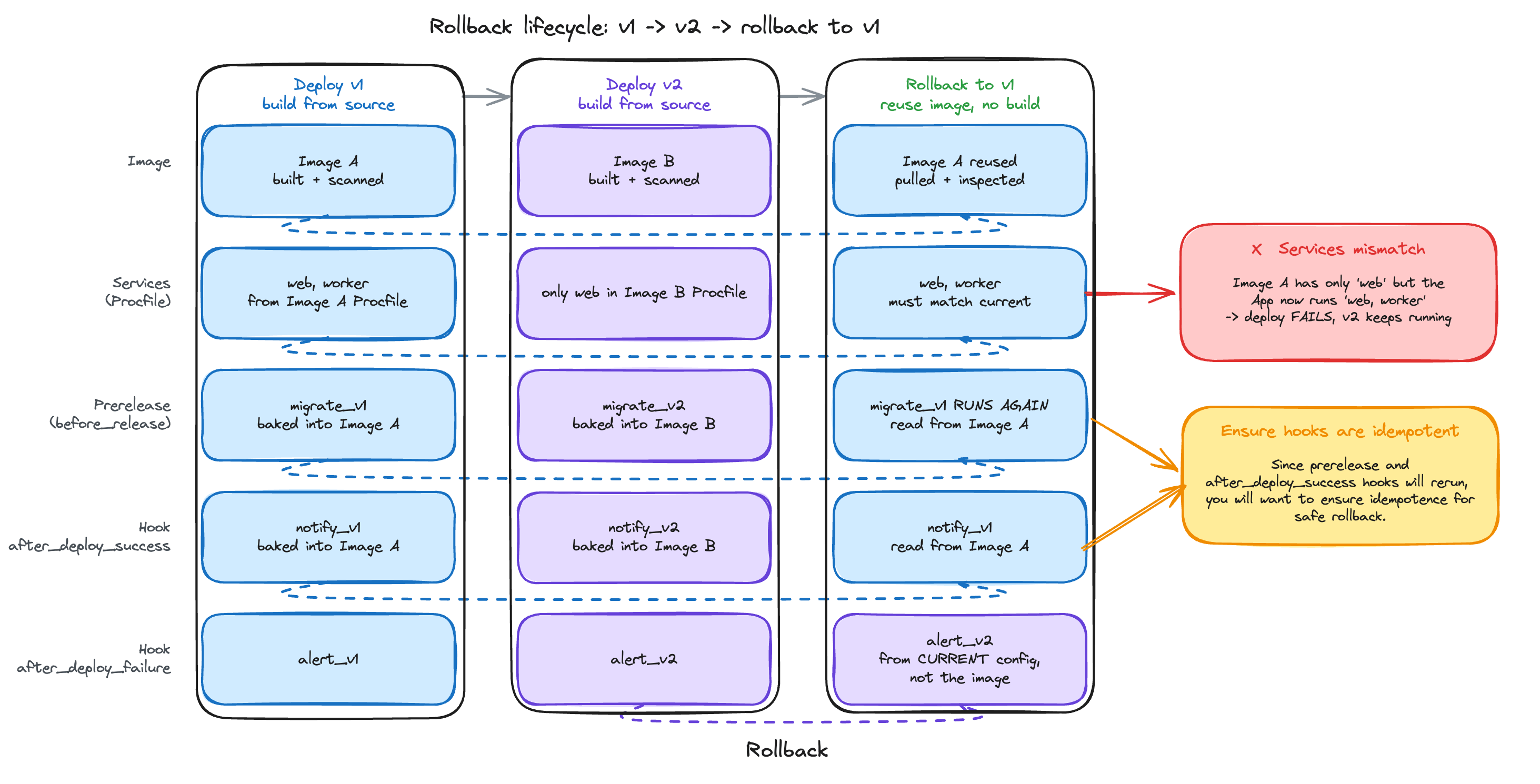 Rollback moves history forward: it creates a new deployment rather than deleting later ones, so you can roll back a rollback.
### What comes from the old image
| Thing | Comes from |
| - | - |
| Container image | The selected deployment |
| Services and process types | The image's `Procfile` |
| Prerelease commands ([`before_release`](/docs/core-concepts/apps/deploying-apps/releases/aptible-yml#before-release)) | The image's `.aptible.yml` |
| [`after_deploy_success`](/docs/core-concepts/apps/deploying-apps/releases/aptible-yml#after-successfailure-hooks) hook | The image's `.aptible.yml` |
| [`after_deploy_failure`](/docs/core-concepts/apps/deploying-apps/releases/aptible-yml#after-successfailure-hooks) hook | Your App's current configuration |
| Environment variables | Your current values, unless you restore them |
| Container size and count | Your current Service settings |
**Prerelease commands run again, and they come from the old image.**
Aptible does not substitute your App's current `before_release` commands, so a migration the old image ran will run again. If that would be destructive, deploy a fix forward instead.
An image with no `.aptible.yml` has no prerelease commands and no success hook, and Aptible does not fall back to your current ones. `after_deploy_failure` is the exception: a new failure hook only takes effect after a deploy succeeds, so it comes from your current configuration.
### Restoring environment variables
You can optionally restore the [Configuration](/docs/core-concepts/apps/deploying-apps/configuration) from the deployment you're rolling back to.
**Restoring replaces your variables. It does not merge them.**
Old values are set back, deleted variables return, and **variables added since then are removed** — including any API key, credential, or feature flag. Leave the option off to revert code only.
`APTIBLE_DOCKER_IMAGE` is never changed, because the rollback already pins the image.
### When rollback isn't available
* **The deployment didn't succeed, or has no image on record** — only successful deployments with an image can be rolled back to.
* **The image's processes no longer match your Services** — Aptible compares them first and fails before anything changes. An image defining only `web` won't roll back onto an App now running `web` and `worker`. Deploy from source instead, so your `Procfile` defines the Services.
* **The image can't be pulled or inspected** — the rollback fails and your App keeps running.
**Git Apps: keep your `Procfile` and `.aptible.yml` inside the image.**
With a custom `Dockerfile`, files at the repository root are read from your Git checkout at build time and **never** copied into the image. A later rollback finds nothing, falls back to a single `cmd` process, and fails the Services check.
```dockerfile theme={null}
COPY Procfile /.aptible/Procfile
COPY .aptible.yml /.aptible/.aptible.yml
```
Only images built after this change are rollbackable.
### Rolling back from the Dashboard
1. Choose **Rollback** — on your App's overview, in the **Last Deployment** panel.
2. Pick a deployment to restore. The most recent successful deployments should be listed; **See more** expands the list with additional recent deployments.
3. Decide whether to also restore environment variables.
4. Choose **Continue** to review your selection, then **Rollback** to start the deploy and follow its logs.
**Make deploys rollback-safe before you need to roll back.** Write migrations so the previous version of your code still runs against the new schema: add columns instead of renaming them, and ship a schema change and the feature depending on it as two deploys. See [Concurrent Releases](/docs/core-concepts/apps/deploying-apps/releases/overview#concurrent-releases).
## Troubleshooting
| What you see | What it means |
| - | - |
| `Reused image's services (...) do not match this app's current services (...)` | The image's processes differ from your current Services. Deploy from source, or see the Git Apps warning. |
| `Error inspecting reused image: ...` | The image couldn't be pulled or read. Retry, then contact [Aptible Support](/docs/how-to-guides/troubleshooting/aptible-support). |
| A migration ran during the rollback | The old image's `before_release` commands ran. Expected. |
| An expected hook didn't run | The image has no `.aptible.yml`, and your current hooks aren't used. |
| Database errors after rolling back | Older code is running against a newer schema. Roll forward instead. |
Rollback moves history forward: it creates a new deployment rather than deleting later ones, so you can roll back a rollback.
### What comes from the old image
| Thing | Comes from |
| - | - |
| Container image | The selected deployment |
| Services and process types | The image's `Procfile` |
| Prerelease commands ([`before_release`](/docs/core-concepts/apps/deploying-apps/releases/aptible-yml#before-release)) | The image's `.aptible.yml` |
| [`after_deploy_success`](/docs/core-concepts/apps/deploying-apps/releases/aptible-yml#after-successfailure-hooks) hook | The image's `.aptible.yml` |
| [`after_deploy_failure`](/docs/core-concepts/apps/deploying-apps/releases/aptible-yml#after-successfailure-hooks) hook | Your App's current configuration |
| Environment variables | Your current values, unless you restore them |
| Container size and count | Your current Service settings |
**Prerelease commands run again, and they come from the old image.**
Aptible does not substitute your App's current `before_release` commands, so a migration the old image ran will run again. If that would be destructive, deploy a fix forward instead.
An image with no `.aptible.yml` has no prerelease commands and no success hook, and Aptible does not fall back to your current ones. `after_deploy_failure` is the exception: a new failure hook only takes effect after a deploy succeeds, so it comes from your current configuration.
### Restoring environment variables
You can optionally restore the [Configuration](/docs/core-concepts/apps/deploying-apps/configuration) from the deployment you're rolling back to.
**Restoring replaces your variables. It does not merge them.**
Old values are set back, deleted variables return, and **variables added since then are removed** — including any API key, credential, or feature flag. Leave the option off to revert code only.
`APTIBLE_DOCKER_IMAGE` is never changed, because the rollback already pins the image.
### When rollback isn't available
* **The deployment didn't succeed, or has no image on record** — only successful deployments with an image can be rolled back to.
* **The image's processes no longer match your Services** — Aptible compares them first and fails before anything changes. An image defining only `web` won't roll back onto an App now running `web` and `worker`. Deploy from source instead, so your `Procfile` defines the Services.
* **The image can't be pulled or inspected** — the rollback fails and your App keeps running.
**Git Apps: keep your `Procfile` and `.aptible.yml` inside the image.**
With a custom `Dockerfile`, files at the repository root are read from your Git checkout at build time and **never** copied into the image. A later rollback finds nothing, falls back to a single `cmd` process, and fails the Services check.
```dockerfile theme={null}
COPY Procfile /.aptible/Procfile
COPY .aptible.yml /.aptible/.aptible.yml
```
Only images built after this change are rollbackable.
### Rolling back from the Dashboard
1. Choose **Rollback** — on your App's overview, in the **Last Deployment** panel.
2. Pick a deployment to restore. The most recent successful deployments should be listed; **See more** expands the list with additional recent deployments.
3. Decide whether to also restore environment variables.
4. Choose **Continue** to review your selection, then **Rollback** to start the deploy and follow its logs.
**Make deploys rollback-safe before you need to roll back.** Write migrations so the previous version of your code still runs against the new schema: add columns instead of renaming them, and ship a schema change and the feature depending on it as two deploys. See [Concurrent Releases](/docs/core-concepts/apps/deploying-apps/releases/overview#concurrent-releases).
## Troubleshooting
| What you see | What it means |
| - | - |
| `Reused image's services (...) do not match this app's current services (...)` | The image's processes differ from your current Services. Deploy from source, or see the Git Apps warning. |
| `Error inspecting reused image: ...` | The image couldn't be pulled or read. Retry, then contact [Aptible Support](/docs/how-to-guides/troubleshooting/aptible-support). |
| A migration ran during the rollback | The old image's `before_release` commands ran. Expected. |
| An expected hook didn't run | The image has no `.aptible.yml`, and your current hooks aren't used. |
| Database errors after rolling back | Older code is running against a newer schema. Roll forward instead. |