> ## Documentation Index
> Fetch the complete documentation index at: https://www.aptible.com/docs/llms.txt
> Use this file to discover all available pages before exploring further.
# TLS Endpoints
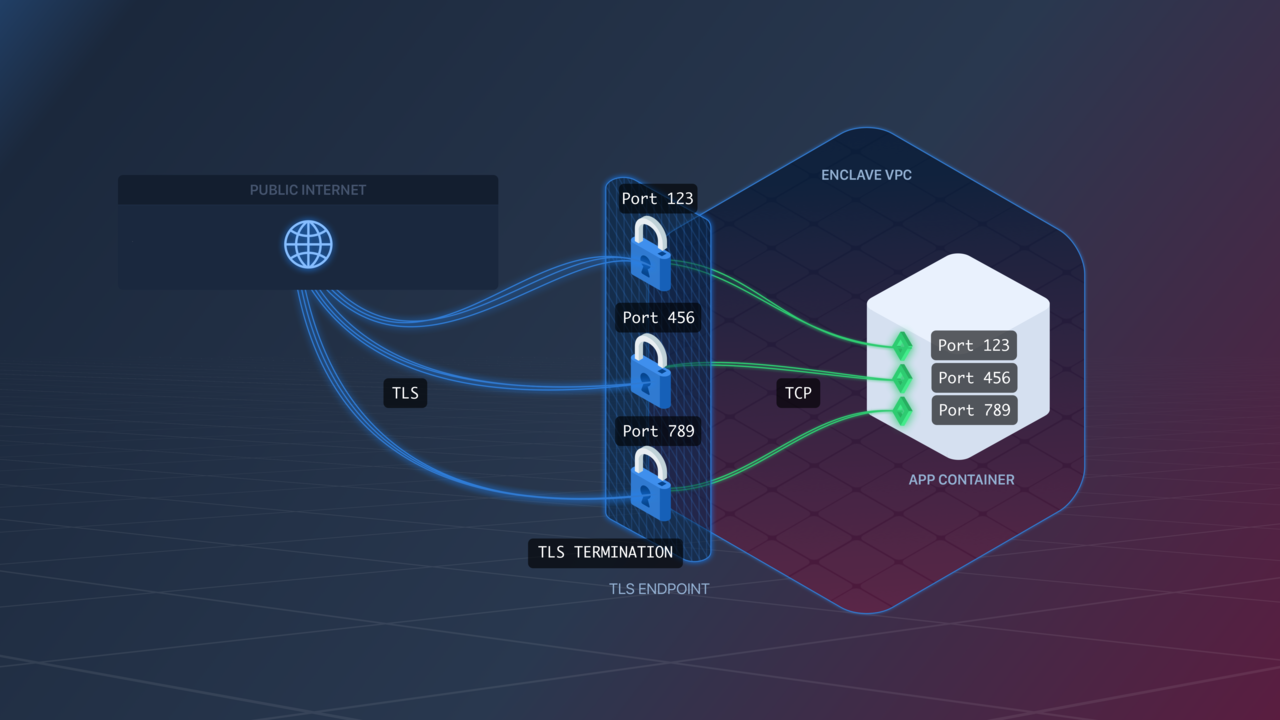 TLS Endpoints can be created using the [`aptible endpoints:tls:create`](/reference/aptible-cli/cli-commands/cli-endpoints-tls-create) command.
## Traffic
TLS Endpoints terminate TLS traffic and transfer it as plain TCP to your app.
## Container Ports
TLS Endpoints are configured similarly to [TCP Endpoints](/core-concepts/apps/connecting-to-apps/app-endpoints/tcp-endpoints).
The Endpoint will listen for TLS traffic on exposed ports and transfer it as TCP traffic to your app over the same port. For example, if your [Image](/core-concepts/apps/deploying-apps/image/overview) exposes port `123`, the Endpoint will listen for TLS traffic on port `123`, and forward it as TCP traffic to your app [Containers](/core-concepts/architecture/containers/overview) on port `123`.
Unlike [HTTP(S) Endpoints](/core-concepts/apps/connecting-to-apps/app-endpoints/https-endpoints/overview), TLS Endpoints currently do not provide [Zero-Downtime Deployment](/core-concepts/apps/connecting-to-apps/app-endpoints/https-endpoints/overview#zero-downtime-deployment). If you require Zero-Downtime Deployments for a TLS app, you'd need to architect it yourself, e.g. at the DNS level.
# Idle Timeout
TLS Endpoints enforce an idle timeout on connections. By default, the inactivity timeout is 60 seconds. You can configure a different timeout per endpoint:
```shell theme={null}
aptible endpoints:tls:modify --app "$APP_HANDLE" "$ENDPOINT_HOSTNAME" --idle-timeout 1200
```
In Terraform, set `idle_timeout` on the `aptible_endpoint` resource (see [Endpoint Settings](/reference/terraform#endpoint-settings)).
**Migrating from environment variables:** `IDLE_TIMEOUT` was previously set as an app configuration variable. Once your endpoints are configured, unset it from your app using `aptible config:unset`
# SSL / TLS Settings
Aptible offers a few ways to configure the protocols used by TLS endpoints for TLS termination.
## SSL Protocols Override
The SSL Protocols Override setting lets you customize the SSL/TLS protocols allowed on your Endpoint.
* For TLS Endpoints: you can choose from these combinations:
* `TLSv1 TLSv1.1 TLSv1.2` (default)
* `TLSv1.1 TLSv1.2`
* `TLSv1.2`
* `TLSv1.3`
## SSL Ciphers Override
This setting lets you customize the SSL ciphers used by your Endpoint.
The format is a string accepted by Nginx for its [ssl\_ciphers directive](http://nginx.org/en/docs/http/ngx_http_ssl_module.html#ssl_ciphers).
Pay very close attention to the required format, as a bad value will prevent the proxies from starting.
## Disable Weak Cipher Suites
Enabling this setting causes your Endpoint to stop accepting traffic over the `SSLv3` protocol or using the `RC4` cipher.
We strongly recommend enabling this on all TLS Endpoints.
## Examples
## Set Idle Timeout
```shell theme={null}
aptible endpoints:tls:modify --app "$APP_HANDLE" "$ENDPOINT_HOSTNAME" --idle-timeout 1200
```
## Set SSL Protocols Override
```shell theme={null}
aptible endpoints:tls:modify --app "$APP_HANDLE" "$ENDPOINT_HOSTNAME" \
--ssl-protocols-override "TLSv1.2 TLSv1.3"
```
## Disable Weak Cipher Suites
```shell theme={null}
aptible endpoints:tls:modify --app "$APP_HANDLE" "$ENDPOINT_HOSTNAME" \
--disable-weak-cipher-suites
```
In Terraform, set `ssl_protocols_override`, `ssl_ciphers_override`, and `disable_weak_cipher_suites` on the `aptible_endpoint` resource (see [Endpoint Settings](/reference/terraform#endpoint-settings)).
**Migrating from environment variables:** `SSL_PROTOCOLS_OVERRIDE`, `SSL_CIPHERS_OVERRIDE`, and `DISABLE_WEAK_CIPHER_SUITES` were previously set as app configuration variables. Once your endpoints are configured, unset them from your app using `aptible config:unset`
TLS Endpoints can be created using the [`aptible endpoints:tls:create`](/reference/aptible-cli/cli-commands/cli-endpoints-tls-create) command.
## Traffic
TLS Endpoints terminate TLS traffic and transfer it as plain TCP to your app.
## Container Ports
TLS Endpoints are configured similarly to [TCP Endpoints](/core-concepts/apps/connecting-to-apps/app-endpoints/tcp-endpoints).
The Endpoint will listen for TLS traffic on exposed ports and transfer it as TCP traffic to your app over the same port. For example, if your [Image](/core-concepts/apps/deploying-apps/image/overview) exposes port `123`, the Endpoint will listen for TLS traffic on port `123`, and forward it as TCP traffic to your app [Containers](/core-concepts/architecture/containers/overview) on port `123`.
Unlike [HTTP(S) Endpoints](/core-concepts/apps/connecting-to-apps/app-endpoints/https-endpoints/overview), TLS Endpoints currently do not provide [Zero-Downtime Deployment](/core-concepts/apps/connecting-to-apps/app-endpoints/https-endpoints/overview#zero-downtime-deployment). If you require Zero-Downtime Deployments for a TLS app, you'd need to architect it yourself, e.g. at the DNS level.
# Idle Timeout
TLS Endpoints enforce an idle timeout on connections. By default, the inactivity timeout is 60 seconds. You can configure a different timeout per endpoint:
```shell theme={null}
aptible endpoints:tls:modify --app "$APP_HANDLE" "$ENDPOINT_HOSTNAME" --idle-timeout 1200
```
In Terraform, set `idle_timeout` on the `aptible_endpoint` resource (see [Endpoint Settings](/reference/terraform#endpoint-settings)).
**Migrating from environment variables:** `IDLE_TIMEOUT` was previously set as an app configuration variable. Once your endpoints are configured, unset it from your app using `aptible config:unset`
# SSL / TLS Settings
Aptible offers a few ways to configure the protocols used by TLS endpoints for TLS termination.
## SSL Protocols Override
The SSL Protocols Override setting lets you customize the SSL/TLS protocols allowed on your Endpoint.
* For TLS Endpoints: you can choose from these combinations:
* `TLSv1 TLSv1.1 TLSv1.2` (default)
* `TLSv1.1 TLSv1.2`
* `TLSv1.2`
* `TLSv1.3`
## SSL Ciphers Override
This setting lets you customize the SSL ciphers used by your Endpoint.
The format is a string accepted by Nginx for its [ssl\_ciphers directive](http://nginx.org/en/docs/http/ngx_http_ssl_module.html#ssl_ciphers).
Pay very close attention to the required format, as a bad value will prevent the proxies from starting.
## Disable Weak Cipher Suites
Enabling this setting causes your Endpoint to stop accepting traffic over the `SSLv3` protocol or using the `RC4` cipher.
We strongly recommend enabling this on all TLS Endpoints.
## Examples
## Set Idle Timeout
```shell theme={null}
aptible endpoints:tls:modify --app "$APP_HANDLE" "$ENDPOINT_HOSTNAME" --idle-timeout 1200
```
## Set SSL Protocols Override
```shell theme={null}
aptible endpoints:tls:modify --app "$APP_HANDLE" "$ENDPOINT_HOSTNAME" \
--ssl-protocols-override "TLSv1.2 TLSv1.3"
```
## Disable Weak Cipher Suites
```shell theme={null}
aptible endpoints:tls:modify --app "$APP_HANDLE" "$ENDPOINT_HOSTNAME" \
--disable-weak-cipher-suites
```
In Terraform, set `ssl_protocols_override`, `ssl_ciphers_override`, and `disable_weak_cipher_suites` on the `aptible_endpoint` resource (see [Endpoint Settings](/reference/terraform#endpoint-settings)).
**Migrating from environment variables:** `SSL_PROTOCOLS_OVERRIDE`, `SSL_CIPHERS_OVERRIDE`, and `DISABLE_WEAK_CIPHER_SUITES` were previously set as app configuration variables. Once your endpoints are configured, unset them from your app using `aptible config:unset`