> ## Documentation Index
> Fetch the complete documentation index at: https://www.aptible.com/docs/llms.txt
> Use this file to discover all available pages before exploring further.
# HTTP(S) Endpoints
 HTTP(S) Endpoints can be created in the following ways:
* Using the [`aptible endpoints:https:create`](/reference/aptible-cli/cli-commands/cli-endpoints-https-create) command,
* Using the Aptible Dashboard by:
* Select the App you want to create an endpoint for
* In the **Endpoints** tab, select **New Endpoint**
* Customize the endpoint settings as needed:
* Choose which **Service** you want this endpoint associated with, if applicable
* Specify a [custom container port](https://www.aptible.com/docs/core-concepts/apps/connecting-to-apps/app-endpoints/https-endpoints/overview#container-port), if needed
* Choose the **Endpoint Type**
* [Default domain](/core-concepts/apps/connecting-to-apps/app-endpoints/default-domain)
* [Custom domain](/core-concepts/apps/connecting-to-apps/app-endpoints/custom-domain) with:
* [Managed Certificate](/core-concepts/apps/connecting-to-apps/app-endpoints/managed-tls)
* [Custom Certificate](/core-concepts/apps/connecting-to-apps/app-endpoints/custom-certificate)
* Choose the [Endpoint Placement](https://www.aptible.com/docs/core-concepts/apps/connecting-to-apps/app-endpoints/overview#endpoint-placement)
* Enable [IP Filtering](/core-concepts/apps/connecting-to-apps/app-endpoints/ip-filtering), if necessary
* Enable [Header Authentication](/core-concepts/apps/connecting-to-apps/app-endpoints/https-endpoints/header-authentication) for CDN origin protection, if necessary
* Choose between the Round Robin (default), Least Outstanding Requests, and Weighted Random load balancing algorithms for request routing.
Like all Endpoints, many HTTP(S) Endpoint settings can be modified using the [`aptible endpoints:https:modify`](/reference/aptible-cli/cli-commands/cli-endpoints-https-modify) command; however, Header Authentication can only be configured via the Aptible Dashboard.
# Traffic
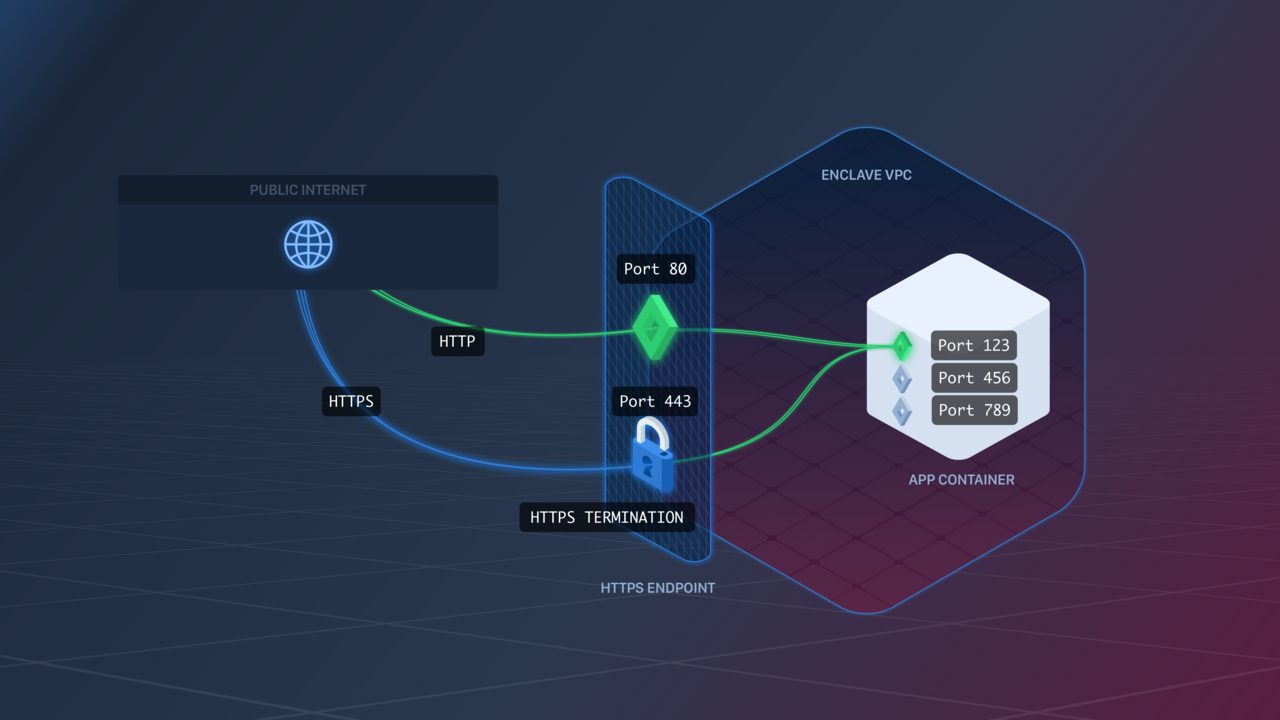
HTTP(S) Endpoints are ideal for web apps. They handle HTTPS termination, and pass it on as HTTP traffic to your app [Containers](/core-concepts/architecture/containers/overview).
HTTP(S) Endpoints can also optionally [redirect HTTP traffic to HTTPS](/core-concepts/apps/connecting-to-apps/app-endpoints/https-endpoints/https-redirect) using the Force SSL endpoint setting.
HTTP(S) Endpoints also allow you to specify how you'd like requests to be routed among containers through the Round Robin, Least Outstanding Requests, and Weighted Random load balancing algorithms.
* Round Robin: The default routing algorithm. Requests are routed evenly to each container sequentially.
* Least Outstanding Requests: Requests are routed to the container with the lowest number of in-process requests.
* Weighted Random: Requests are routed evenly to each container, but in a random order.
HTTP(S) Endpoints can receive client connections from HTTP/1 and HTTP/2, but it is forced down to HTTP/1 through our proxy before it reaches the app.
# Container Port
When creating an HTTP Endpoint, you can specify the container port where traffic should be sent. Different [Endpoints](/core-concepts/apps/connecting-to-apps/app-endpoints/overview) can use different ports, even if they're associated with the same [Service](/core-concepts/apps/deploying-apps/services).
If you don't specify a port, Aptible will pick a default port for you. The default port Aptible picks is the lexicographically lowest port exposed by your [Image](/core-concepts/apps/deploying-apps/image/overview). For example, if your Dockerfile contains `EXPOSE 80 443`, then the default port would be `443`.
It's important to make sure your app is listening on the port the Endpoint will route traffic to, or clients won't be able to access your app.
# Zero-Downtime Deployment
HTTP(S) Endpoints provide zero-downtime deployment: whenever you deploy or restart your [App](/core-concepts/apps/overview), Aptible will ensure that new containers are accepting traffic before terminating old containers. For more information on Aptible's deployment process, see [Releases](/core-concepts/apps/deploying-apps/releases/overview).
***
**Keep reading:**
* [Health Checks](/core-concepts/apps/connecting-to-apps/app-endpoints/https-endpoints/health-checks)
* [HTTP Request Headers](/core-concepts/apps/connecting-to-apps/app-endpoints/https-endpoints/http-request-headers)
* [HTTPS Protocols](/core-concepts/apps/connecting-to-apps/app-endpoints/https-endpoints/https-protocols)
* [HTTPS Redirect](/core-concepts/apps/connecting-to-apps/app-endpoints/https-endpoints/https-redirect)
* [Maintenance Page](/core-concepts/apps/connecting-to-apps/app-endpoints/https-endpoints/maintenance-page)
* [Endpoint Logs](/core-concepts/apps/connecting-to-apps/app-endpoints/https-endpoints/endpoint-logs)
* [Shared Endpoints](/core-concepts/apps/connecting-to-apps/app-endpoints/https-endpoints/shared-endpoints)
* [Header Authentication](/core-concepts/apps/connecting-to-apps/app-endpoints/https-endpoints/header-authentication)
HTTP(S) Endpoints can be created in the following ways:
* Using the [`aptible endpoints:https:create`](/reference/aptible-cli/cli-commands/cli-endpoints-https-create) command,
* Using the Aptible Dashboard by:
* Select the App you want to create an endpoint for
* In the **Endpoints** tab, select **New Endpoint**
* Customize the endpoint settings as needed:
* Choose which **Service** you want this endpoint associated with, if applicable
* Specify a [custom container port](https://www.aptible.com/docs/core-concepts/apps/connecting-to-apps/app-endpoints/https-endpoints/overview#container-port), if needed
* Choose the **Endpoint Type**
* [Default domain](/core-concepts/apps/connecting-to-apps/app-endpoints/default-domain)
* [Custom domain](/core-concepts/apps/connecting-to-apps/app-endpoints/custom-domain) with:
* [Managed Certificate](/core-concepts/apps/connecting-to-apps/app-endpoints/managed-tls)
* [Custom Certificate](/core-concepts/apps/connecting-to-apps/app-endpoints/custom-certificate)
* Choose the [Endpoint Placement](https://www.aptible.com/docs/core-concepts/apps/connecting-to-apps/app-endpoints/overview#endpoint-placement)
* Enable [IP Filtering](/core-concepts/apps/connecting-to-apps/app-endpoints/ip-filtering), if necessary
* Enable [Header Authentication](/core-concepts/apps/connecting-to-apps/app-endpoints/https-endpoints/header-authentication) for CDN origin protection, if necessary
* Choose between the Round Robin (default), Least Outstanding Requests, and Weighted Random load balancing algorithms for request routing.
Like all Endpoints, many HTTP(S) Endpoint settings can be modified using the [`aptible endpoints:https:modify`](/reference/aptible-cli/cli-commands/cli-endpoints-https-modify) command; however, Header Authentication can only be configured via the Aptible Dashboard.
# Traffic
HTTP(S) Endpoints are ideal for web apps. They handle HTTPS termination, and pass it on as HTTP traffic to your app [Containers](/core-concepts/architecture/containers/overview).
HTTP(S) Endpoints can also optionally [redirect HTTP traffic to HTTPS](/core-concepts/apps/connecting-to-apps/app-endpoints/https-endpoints/https-redirect) using the Force SSL endpoint setting.
HTTP(S) Endpoints also allow you to specify how you'd like requests to be routed among containers through the Round Robin, Least Outstanding Requests, and Weighted Random load balancing algorithms.
* Round Robin: The default routing algorithm. Requests are routed evenly to each container sequentially.
* Least Outstanding Requests: Requests are routed to the container with the lowest number of in-process requests.
* Weighted Random: Requests are routed evenly to each container, but in a random order.
HTTP(S) Endpoints can receive client connections from HTTP/1 and HTTP/2, but it is forced down to HTTP/1 through our proxy before it reaches the app.
# Container Port
When creating an HTTP Endpoint, you can specify the container port where traffic should be sent. Different [Endpoints](/core-concepts/apps/connecting-to-apps/app-endpoints/overview) can use different ports, even if they're associated with the same [Service](/core-concepts/apps/deploying-apps/services).
If you don't specify a port, Aptible will pick a default port for you. The default port Aptible picks is the lexicographically lowest port exposed by your [Image](/core-concepts/apps/deploying-apps/image/overview). For example, if your Dockerfile contains `EXPOSE 80 443`, then the default port would be `443`.
It's important to make sure your app is listening on the port the Endpoint will route traffic to, or clients won't be able to access your app.
# Zero-Downtime Deployment
HTTP(S) Endpoints provide zero-downtime deployment: whenever you deploy or restart your [App](/core-concepts/apps/overview), Aptible will ensure that new containers are accepting traffic before terminating old containers. For more information on Aptible's deployment process, see [Releases](/core-concepts/apps/deploying-apps/releases/overview).
***
**Keep reading:**
* [Health Checks](/core-concepts/apps/connecting-to-apps/app-endpoints/https-endpoints/health-checks)
* [HTTP Request Headers](/core-concepts/apps/connecting-to-apps/app-endpoints/https-endpoints/http-request-headers)
* [HTTPS Protocols](/core-concepts/apps/connecting-to-apps/app-endpoints/https-endpoints/https-protocols)
* [HTTPS Redirect](/core-concepts/apps/connecting-to-apps/app-endpoints/https-endpoints/https-redirect)
* [Maintenance Page](/core-concepts/apps/connecting-to-apps/app-endpoints/https-endpoints/maintenance-page)
* [Endpoint Logs](/core-concepts/apps/connecting-to-apps/app-endpoints/https-endpoints/endpoint-logs)
* [Shared Endpoints](/core-concepts/apps/connecting-to-apps/app-endpoints/https-endpoints/shared-endpoints)
* [Header Authentication](/core-concepts/apps/connecting-to-apps/app-endpoints/https-endpoints/header-authentication)